 NexGPU-算力租赁,GPU服务器,GPU云算力,AI服务器租用-新闻博客
Against the backdrop of rapid iteration in large AI models, AI GPU rental has evolved from an initial "emergency card grab" to a core strategy for enterprises and developers to control R&D costs and improve deployment efficiency. However, faced with a complex array of GPU models, wide price ranges, and non-negligible hidden costs, how do you choose the cloud compute resources that best match your business needs?
This article will combine the latest compute market monitoring data from July 2026 to break down the real cost structure of GPU rental and provide actionable selection and deployment recommendations.
1. The New Landscape of AI GPU Rental in 2026: Price Divergence and Demand Shift
According to industry research by IntuitionLabs and Thunder Compute released in July 2026, the current cloud GPU rental market exhibits two notable characteristics:
- Extreme price divergence in compute rental: On-demand prices for the same GPU model vary several-fold across providers. For example, the NVIDIA H100 (80GB) on-demand rental ranges from approximately $1.49 – $3.50 per hour on specialized clouds and compute markets, while on traditional hyperscale clouds it can be as high as $7.00 – $11.60+.
- Inference scenarios dominate: With the adoption of multimodal large models and agents, rental for inference and lightweight fine-tuning has surpassed large-scale pre-training. Developers are no longer blindly seeking the highest-spec 10,000-GPU clusters but are increasingly focused on memory bandwidth, throughput bottlenecks, and cost-effectiveness.
Based on Vast.ai's real-time price guide published in July 2026, reference on-demand rental prices for different generations of hardware are as follows:
| GPU Model | Memory / Spec | Typical Use Cases | Real-time On-Demand Rental (per GPU/hour) |
|---|---|---|---|
| NVIDIA B200 / B300 | 192GB+ HBM3e | Trillion-parameter model training and high-concurrency inference | $4.50 – $6.88 |
| NVIDIA H200 | 141GB HBM3e | Full fine-tuning of 70B+ parameter models and long-context inference | $2.50 – $3.99 |
| NVIDIA H100 SXM | 80GB HBM3 | Large model pre-training and medium-to-large inference | $1.75 – $3.50 |
| NVIDIA RTX 5090 | 32GB GDDR7 | Fine-tuning open-source small models, image/video generation inference | $0.40 – $0.65 |
| NVIDIA RTX 4090 | 24GB GDDR6X | Developer experimentation, lightweight LoRA fine-tuning, and API testing | $0.30 – $0.45 |
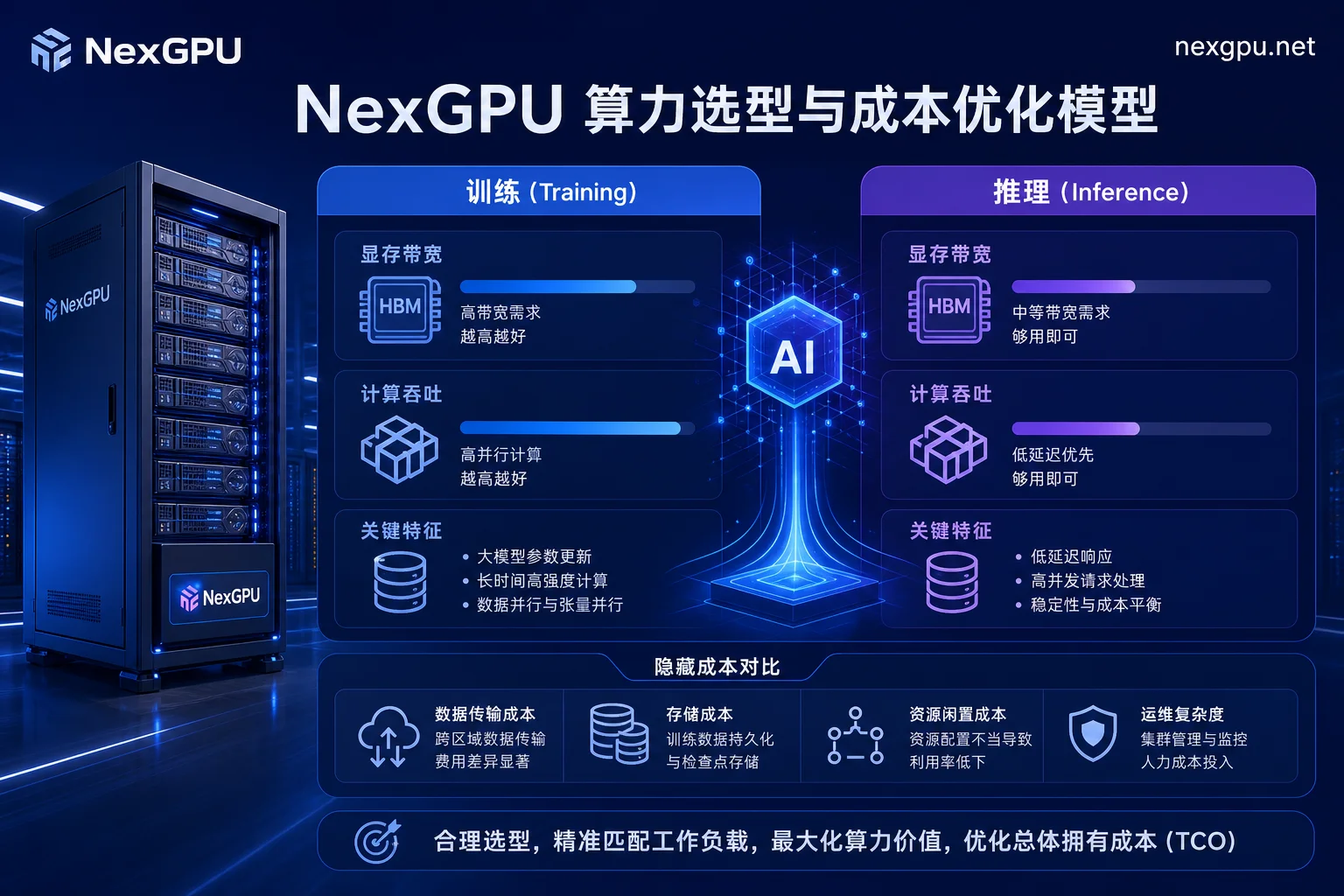
2. Rejecting "Budget Assassins": Three Hidden Costs of AI GPU Rental
Many teams only calculate the "GPU unit price × usage hours" when assessing compute budgets, leading to final bills that exceed expectations by 2-3 times. When selecting a compute platform, be especially wary of the following hidden expenses:
1. Data Transfer and Egress Fees
When training or deploying inference services in the cloud, downloading weight files, syncing datasets, and returning API results generate massive data transfers. The per-GB traffic fees charged by traditional public clouds often become a heavy burden on the bill.
2. Compute Idle Time and Environment Configuration
After renting bare metal or virtual machines, configuring CUDA drivers, installing PyTorch, and compiling vLLM or DeepSpeed can take hours. During this time, the expensive GPU is still being billed by the second.
3. Invalid Computation Due to Memory Overflow
If the model is poorly chosen (e.g., running a 32B parameter model on 24GB VRAM), memory overflow (OOM) is likely to occur during peak concurrent requests, causing service or training interruptions and wasting compute hours.
3. Scenario-Based Selection for Precise Choices
To avoid resource waste, algorithm engineering and MLOps teams should follow the principle of "scenario matching" when procuring AI compute:
- Large model deployment and high-concurrency inference: Prioritize memory capacity and memory bandwidth. For example, when deploying a 70B-level model with vLLM or TensorRT-LLM, a single H200 (141GB) card or multiple H100 cards can provide higher Key-Value Cache space, thereby maintaining high throughput while reducing per-token costs.
- Small and medium-sized model fine-tuning and prototyping: For open-source models with 7B/8B/14B parameters (e.g., Llama 3, Qwen 2.5 series), RTX 4090 or RTX 5090 nodes are sufficient. With AWQ/GPTQ quantization, you can rapidly iterate at lower compute costs.
4. NexGPU: High-Efficiency Compute and Agile Deployment for AI Developers
To address these selection and cost pain points, NexGPU, as a professional GPU cloud compute and AI server rental platform, is dedicated to providing transparent and flexible compute supply for developers and teams.
For different R&D stages and computing loads, NexGPU offers the following core advantages:
- Rich selection of GPU server models: The platform covers from high-performance data center cards (e.g., H100, H200) to cost-effective consumer/professional GPUs (e.g., RTX 4090/5090), meeting the precision and memory requirements of different-scale model training and inference.
- Pay-as-you-go, instant startup: Supports elastic on-demand rental, allowing you to start and release resources anytime, avoiding the financial pressure of long-term fixed contracts and effectively eliminating resource idle waste.
- Pre-built model and application templates: Built-in deployment templates for mainstream open-source large models and inference frameworks (e.g., PyTorch, vLLM, Ollama), enabling out-of-the-box use and reducing environment setup from hours to minutes.
Through this combination of "flexible hardware + pre-built environments," NexGPU helps AI teams significantly reduce compute trial-and-error costs and focus on core algorithms and product logic.
5. Actionable Recommendations for Optimizing AI Compute Costs
- Use pay-as-you-go during testing: During model tuning or light inference testing, use on-demand instances and release them immediately after validation.
- Leverage pre-built images and templates: Use platform-provided environment templates to avoid unnecessary billing time on driver and dependency configuration.
- Dynamically adjust GPU nodes based on concurrency: In the early stages, use single-card or lightweight GPUs for inference serving, and smoothly migrate to higher-spec clusters as request volume grows.


Comments(0)