 NexGPU-算力租赁,GPU服务器,GPU云算力,AI服务器租用-新闻博客
With the rapid iteration of generative AI and large language models (LLMs), GPU rental has become a core means for enterprises and developers to access high-performance compute. Entering July 2026, with the further mass production of NVIDIA's Blackwell architecture (such as B200), the market supply of Hopper architecture (H100/H200) is gradually stabilizing, and the price landscape of the GPU cloud market has undergone profound changes.
For algorithm engineers and MLOps procurement decision-makers, how can they find the optimal solution between performance and cost across different compute tiers, VRAM capacities, and billing models? Based on the latest industry data and vendor quotes from July 2026, this article breaks down GPU rental price trends, selection logic, and inference/training optimization strategies.
July 2026 GPU Rental Market Status: Compute Tiers and Price Differentiation
According to statistics released by multiple cloud computing platforms and industry research institutions in July 2026, the GPU rental market shows clear differentiation across service provider types and VRAM configurations:
- Significant pricing gaps across service provider tiers: Traditional hyperscalers, which bundle complex enterprise-grade compliance and ecosystem services, still maintain single-card H100 on-demand prices at a high of $6.88 to $7.43 per hour; while specialized AI cloud platforms and Neo-clouds have reduced on-demand prices to $1.80 to $3.50 per hour, with an overall premium difference exceeding 90%.
- VRAM has become a core requirement: With the proliferation of 70B+ parameter large models and long-context scenarios, single-card VRAM capacity and bandwidth directly determine the number of nodes required for deployment. H200, with its 141GB HBM3e memory, has a market on-demand average price stable at $3.00 to $4.07 per hour, significantly lowering the barrier to running large models on a single node.
- Blackwell architecture gradually penetrating: B200 (192GB HBM3e) is priced at $4.50 to $6.20 per hour on-demand in the specialized compute market, providing a high-density option for distributed training and extremely high-concurrency inference.
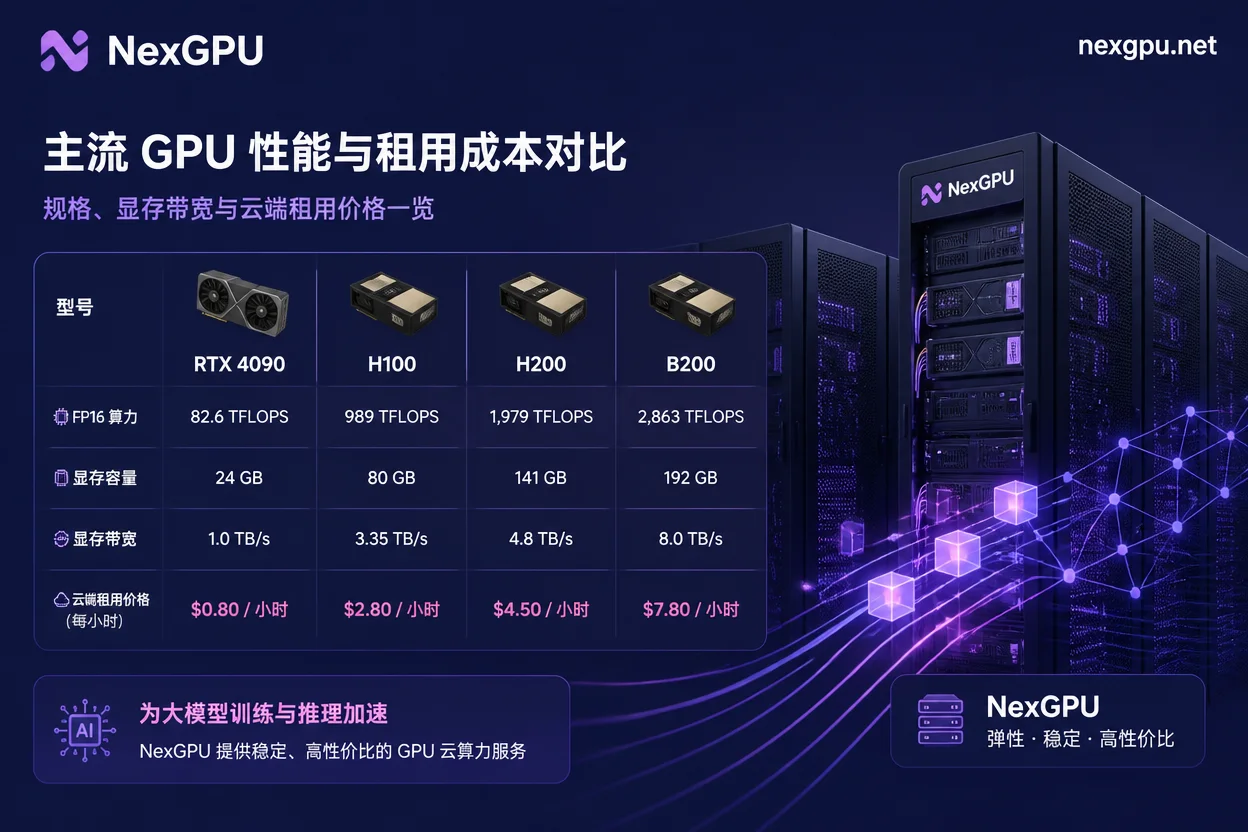
Comparison of Mainstream GPU Model Parameters and Rental Costs
When selecting a GPU rental, focusing only on single-card hourly prices can easily overlook the hidden TCO (Total Cost of Ownership) brought by throughput and VRAM. The table below summarizes the core technical parameters and suitable use cases of current mainstream compute cards:
| GPU Model | Architecture | VRAM/Type | VRAM Bandwidth | July 2026 On-Demand Rental Reference | Best Use Cases |
|---|---|---|---|---|---|
| NVIDIA RTX 4090 / 5090 | Ada / Blackwell | 24GB - 32GB GDDR6X/GDDR7 | 1.0 - 1.79 TB/s | $0.34 - $0.47 / hour | Lightweight model fine-tuning, image generation, single-card inference testing |
| NVIDIA H100 SXM | Hopper | 80GB HBM3 | 3.35 TB/s | $1.80 - $3.50 / hour | Common LLM (13B-70B) distributed training and parallel inference |
| NVIDIA H200 SXM | Hopper | 141GB HBM3e | 4.8 TB/s | $3.00 - $4.07 / hour | 70B+ model single-node inference, ultra-long context processing |
| NVIDIA B200 SXM | Blackwell | 192GB HBM3e | 8.0 TB/s | $4.50 - $6.20 / hour | Trillion-parameter MoE model inference, high-throughput cluster training |
Practical Cost Optimization Strategies for LLM Inference and Training
To maximize the use of GPU rental resources and avoid compute idleness and waste, technical teams should implement the following optimization measures in actual deployment:
1. Enhance Throughput with Continuous Batching and FP8 Quantization
When deploying with vLLM or TensorRT-LLM frameworks, enabling Continuous Batching can increase GPU VRAM utilization from 20% to over 70%. Additionally, using FP8/FP4 quantization formats can reduce VRAM usage by 50% without significantly affecting inference accuracy, allowing larger models to run on lighter GPU nodes.
2. Avoid Long-Term Commitments and Leverage On-Demand and Dynamic Compute
Traditional annual contracts for fixed compute can easily lead to cost waste during hardware iteration periods. For rapidly evolving R&D projects, on-demand and instant-start models ensure resources are released as soon as tasks complete.
From Market Trends to Implementation: NexGPU Compute Ecosystem and Scenario Adaptation
In response to the challenges AI developers and enterprises face in compute procurement—such as high prices, complex configurations, and long deployment cycles—NexGPU positions itself as a GPU cloud compute and AI server rental platform, offering a variety of GPU server models, pay-as-you-go usage, instant deployment, and pre-built models and application templates for various scenarios.
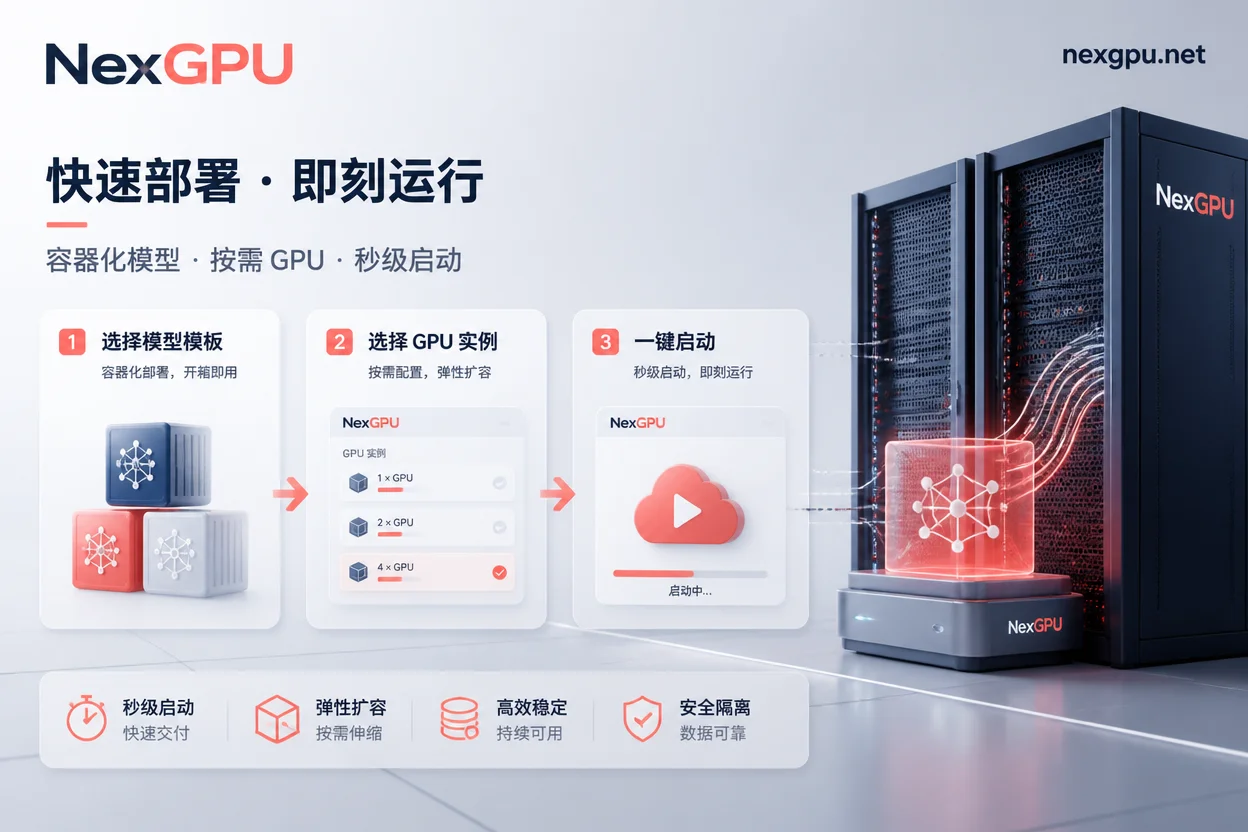
In specific business implementation, NexGPU can help teams complete compute migration and execution in the following ways:
- Precise VRAM Matching and Compute Tier Selection: For daily testing and fine-tuning by small- and medium-sized teams, choosing pay-as-you-go lightweight instances or single-card H100/H200 on NexGPU avoids the risk of compute sink costs associated with long-term contracts.
- Template-Based One-Click Deployment: Developers only need to select an image and VRAM spec in the platform console, and within minutes they can set up an inference or fine-tuning environment integrated with vLLM, PyTorch, and WebUI using pre-built models and application templates, saving complex driver and dependency configuration time.
- Elastic Pay-as-You-Go: Supports start-stop based on actual business load, significantly reducing hardware expenses during the validation phase.
Brand Interaction: Is Your Model Deployment Facing VRAM Bottlenecks or Compute Premium?
When evaluating compute procurement plans, what is the biggest challenge your team is currently facing? Is it the high premium charged by hyperscalers, or insufficient VRAM for 70B+ models?
Soft Actionable Suggestion: Before large-scale deployment, it is recommended to first calculate the model's peak concurrent Token throughput and KV-Cache memory requirements. You can visit the NexGPU platform, select pay-as-you-go GPU resources and pre-built templates suitable for your scenario, and conduct short-term performance benchmark tests to find the optimal balance between compute and cost.


Comments(0)