 NexGPU-算力租赁,GPU服务器,GPU云算力,AI服务器租用-新闻博客
Looking only at list prices, spot instances are usually the cheapest, while reserved instances are the most stable. When calculating total cost, the conclusion depends on two things: whether the task can continue after being interrupted, and how high the actual utilization rate of the GPU will be over the next year.
- For offline tasks that can resume from checkpoints, are large in volume, and are not time-sensitive, spot instances are suitable.
- For online inference that runs at full capacity around the clock and whose specifications will not change in the short term, reserved instances are suitable.
- For fine-tuning, prototype validation, and intermittent testing with cycles ranging from a few hours to a few weeks, both options tend to cost more. Choosing no-contract, hourly-billed compute usually carries the lowest financial risk.
The following sections explain how to make the judgment and where the money goes.
Where Each Instance Type Saves Money and What the Trade-offs Are
Spot instances sell idle compute capacity from cloud providers, often priced 60%–90% lower than on-demand. The trade-off is that instances can be reclaimed at any time. For example, AWS gives about 2 minutes' notice before reclamation, while some platforms give only 30 seconds. When an instance is stopped or terminated, in-memory state and unsaved intermediate weights are lost.
Reserved instances or committed use discounts (such as Savings Plans) generally offer about 30%–72% savings and guarantee GPU availability. The prerequisite is signing a 1-year or 3-year spending commitment. After signing, you are billed for the committed amount regardless of whether tasks are running.
Notification periods, reclamation rules, and contract terms vary by platform. Before ordering, please refer to the documentation of the platform you use.
Classify Tasks with Two Questions
Question 1: Can the task continue after being interrupted? If any of the following apply, consider it "interruptible": the training code periodically saves checkpoints and supports resuming from them; inference is asynchronous batch processing that can automatically retry on failure; task results can be recomputed without affecting the final output, such as data cleaning and offline labeling.
Question 2: What is the actual utilization rate of the GPU over the next year? Estimate based on actual hours spent running tasks, not peak usage.
Combining the answers to these two questions:
- Interruptible, large volume, not urgent: prioritize spot instances.
- Not interruptible, full capacity around the clock, specifications unchanged within a year: consider reserved instances.
- Not interruptible, but only intermittent use: use on-demand or hourly-billed instances.
- Short cycle, still experimenting: use hourly billing, do not sign a contract.
Spot Instances: Three Hidden Costs Beyond the List Price
1. Redone progress. When reclaimed, all computation from the last checkpoint to the moment of reclamation is lost, and rescheduling and startup also take time. The longer the checkpoint interval, the more progress is lost per interruption. The shorter the interval, the more training time is consumed writing checkpoints. This interval needs to be adjusted based on measured interruption frequency.
2. Checkpoint storage costs. To guard against interruptions, checkpoints must be written frequently to storage or object storage outside the instance. Another often overlooked point is that after an instance is interrupted or stopped, attached cloud disks often continue to be billed—this is the case with AWS EBS. If not actively deleted, these idle disks will keep generating charges.
3. Download costs for rerunning on new nodes. Restarting the task on a new node requires downloading tens of GB of model weights and datasets again. This takes time and may incur data transfer fees.
To estimate the true cost of spot instances, use this formula:
Effective unit price ≈ spot unit price × actual GPU-hours consumed ÷ GPU-hours that actually produced results, plus checkpoint storage fees and repeated download traffic fees
If a task must restart from scratch after every interruption, this ratio will quickly grow, and the discount is largely offset. Also note: cloud providers generally do not disclose actual interruption rates for flagship GPUs in each availability zone. It is hard to calculate accurately in advance. A safer approach is to run a small-scale test for a period, record the actual number of interruptions, and then decide whether to move the entire batch onto spot instances.
Reserved Instances: Utilization Determines Whether They Pay Off
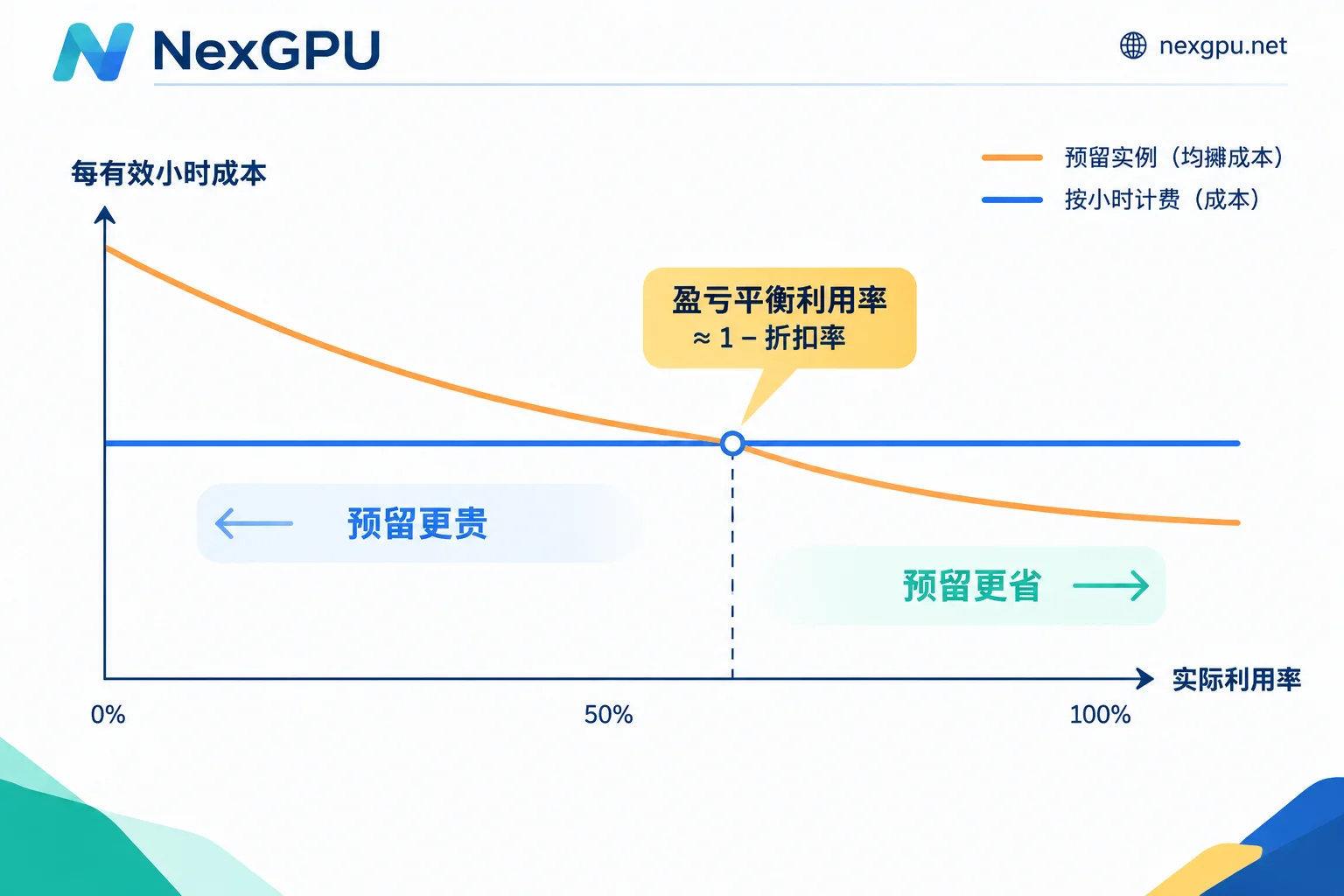
Whether a reserved instance pays off can be judged with a simple break-even line:
Break-even utilization ≈ 1 − discount rate
For example, with a 40% discount, actual utilization must exceed 60% to be cheaper than on-demand. With a 60% discount, utilization must exceed 40%. Generally, for tasks with actual usage below 50%–60%, the amortized cost of a long-term reservation can easily exceed hourly billing.
This line only considers money, not two types of risk:
- Locked specifications: 1–3 year contracts lock in GPU architecture, memory size, and compute specifications. If new open-source models raise the memory threshold, older cards may simply be unable to run them.
- Hardware depreciation: If a new generation of GPUs offers significantly better performance per dollar, old card contracts cannot be canceled, and the remaining committed amount becomes a sunk cost.
So in AI businesses, before deciding on a reservation, besides calculating utilization, ask: will this GPU's specifications still be sufficient a year from now? For how to estimate utilization by business stage, see How to Compare Proprietary Cloud and Public Cloud GPU Costs.
Fine-Tuning, Prototyping, and Intermittent Inference: Neither Option Fits Well
Many individual developers and small teams have tasks in this category, such as fine-tuning an open-source model, validating an inference solution, or running batch generation a few times a week. These tasks have low utilization, so signing a reservation contract is not cost-effective. They may also not tolerate interruptions: getting reclaimed halfway through hyperparameter tuning could cost more in troubleshooting and rerunning than the GPU fees saved.
Such tasks are better suited to no-contract, hourly-billed compute. Take NexGPU as an example: it bills by the hour, meters by the second, has no minimum spend, and requires no contract. The unit price is locked at order time and remains unchanged until the instance is destroyed. The bill has only three items: compute, storage, and traffic—every expense can be traced.
One boundary to remember: storage fees continue after shutdown; all billing stops only after destruction. This is the same issue as cloud disks continuing to be billed after a spot instance is stopped. After a task is done, first move results and checkpoints out of the instance, then destroy the instance, and all fees will stop. For specific methods, see How to Save Data on a Rented GPU Instance and Does a GPU Instance Still Charge After Shutdown?.
Pre-Order Checklist to Avoid Pitfalls
- Before using spot instances, rehearse an interruption: manually terminate the task and confirm it can resume from the latest checkpoint, not from scratch.
- Write checkpoints outside the instance and clean them up regularly: keep only the most recent few to avoid accumulating storage fees.
- After the task ends, confirm the disk is deleted: stopping without deleting the disk will not stop the bill.
- Reduce repeated downloads: use images with pre-installed environments as much as possible. Store frequently used weights in storage close to compute nodes so you don't have to download from scratch every time you change nodes.
- Before signing a reservation, calculate utilization from historical data: use actual running hours from the past few months, not peak estimates. When unsure, run on hourly billing for a quarter first, see the usage curve, then decide.
- Online businesses can use a combination: use long-term resources for stable baseline load, hourly billing for burst peaks, and spot instances for offline batch processing.
Next Steps
If your task involves fine-tuning, prototype validation, or intermittent inference, you can directly check available nodes and current unit prices on the NexGPU pricing page, and choose a GPU based on the memory your task needs.
If you are evaluating multi-GPU long-term stable operation, such as an online inference cluster or long-term training, and need to determine capacity and specifications, we suggest first preparing a requirements list according to How to Consult About Enterprise GPU Clusters and Reserved Instances, then contact sales to discuss a solution.



Comments(0)