 NexGPU-算力租赁,GPU服务器,GPU云算力,AI服务器租用-新闻博客
Conclusion First
Whether it's a waste depends on what model you're running, how many concurrent requests you have, and how long your context is.
- Likely wasteful: Running small to medium models like 7B, 13B, or 14B for debugging or with low concurrency. In this case, VRAM sits idle and GPU utilization is low. Switching to an RTX 4090 (24GB) or L40S (48GB) is usually sufficient and costs significantly less per hour.
- Worth it: Running a 70B-class INT4 or AWQ quantized model on a single card, doing large-batch offline inference, or handling long contexts of tens of thousands of tokens or Agent tasks. With 80GB VRAM and ~2 TB/s HBM2e bandwidth, the cost per token actually becomes advantageous in these scenarios.
- Not enough: A 70B model in FP8 precision while also serving concurrent requests. Here the problem isn't waste—it's that a single A100 80GB can't fit it, and you need a different setup.
Below we explain how to tell which category you fall into, and how to verify with real workloads before going live.
Why Small Workloads Waste an A100
When a large model generates text, every output token requires reading all model weights from VRAM. So inference is mainly bottlenecked by memory bandwidth, and compute is often underutilized.
With only one request running (Batch Size = 1), GPU compute utilization is typically only 10%–20%. The A100's high compute sits idle most of the time, and VRAM only holds a small model's weights. You're paying data-center card rental prices but using only a fraction of its capability, so the cost per token is high.
To utilize the A100's bandwidth and VRAM, you need enough concurrent requests or a large enough batch. If the load can't ramp up, even the best card sits idle.
Three Questions to Determine Your Category
1. How big is the model, and what precision?
This determines the minimum VRAM requirement. For 7B to 14B models, plus runtime overhead, VRAM demand is roughly 14GB–30GB. A single RTX 4090 or L40S can fit it, and image generation tasks generally fall in this range. A 70B model quantized with INT4 or AWQ takes about 35GB–40GB for weights, which is where 80GB VRAM starts to show its value.
2. How many concurrent requests?
Besides model weights, VRAM must hold KV Cache. Each concurrent request and each context segment consumes VRAM, and higher concurrency means more. The VRAM needed for one person debugging versus a production API can differ by several times.
3. How long is the context?
For tasks like long-document QA or multi-turn Agents, a single request's KV Cache can be large. When context reaches tens of thousands of tokens, the remaining VRAM that was previously sufficient quickly fills up.
Combining all three answers, you can roughly map as follows:
| Your Scenario | Is A100 80GB Suitable? | More Common Choice |
|---|---|---|
| 7B–14B model, debugging or low concurrency | Likely wasteful | RTX 4090 24GB or L40S 48GB |
| Small to medium model serving, inference pipeline fully on FP8 | Not necessarily most cost-effective | L40S (native FP8 support) |
| 70B INT4/AWQ quantized, with concurrency or long context | Suitable | A100 80GB |
| Large-batch offline processing, can continuously saturate bandwidth | Suitable | A100 80GB |
| 70B FP8 or higher precision, with concurrency | Single card insufficient | Dual-card tensor parallelism, or card with larger VRAM |
For in-between cases, like a ~30B model or wondering if 48GB is enough, see How large a model can 48GB VRAM run. To directly compare L40S and A100, see Which is better for inference: L40S or A100.
Precision Also Affects the Conclusion
The A100 is Ampere architecture, mainly supporting FP16 and BF16, without a native FP8 Transformer Engine. L40S (Ada Lovelace) and H100 (Hopper) natively support FP8 compute.
If your inference system has fully switched to FP8, the L40S may offer better throughput-per-cost and energy efficiency than the A100 for small to medium models. If you mainly use FP16 or BF16, or INT4 quantization like AWQ or GPTQ, this difference matters less.
VRAM Trap: Fitting the Model Doesn't Mean Stable Operation
A common mistake when choosing a card is calculating VRAM based only on weight size.
Take a 70B model in FP8: weights alone take ~70GB, leaving only ~6GB of 80GB VRAM for KV Cache and runtime overhead. A single short request might work, but with more concurrency or longer prompts, out-of-memory (OOM) errors easily occur. In this case, a single A100 80GB is insufficient. For stable production, you typically need two cards for tensor parallelism, or a card with larger VRAM, such as H200's 141GB.
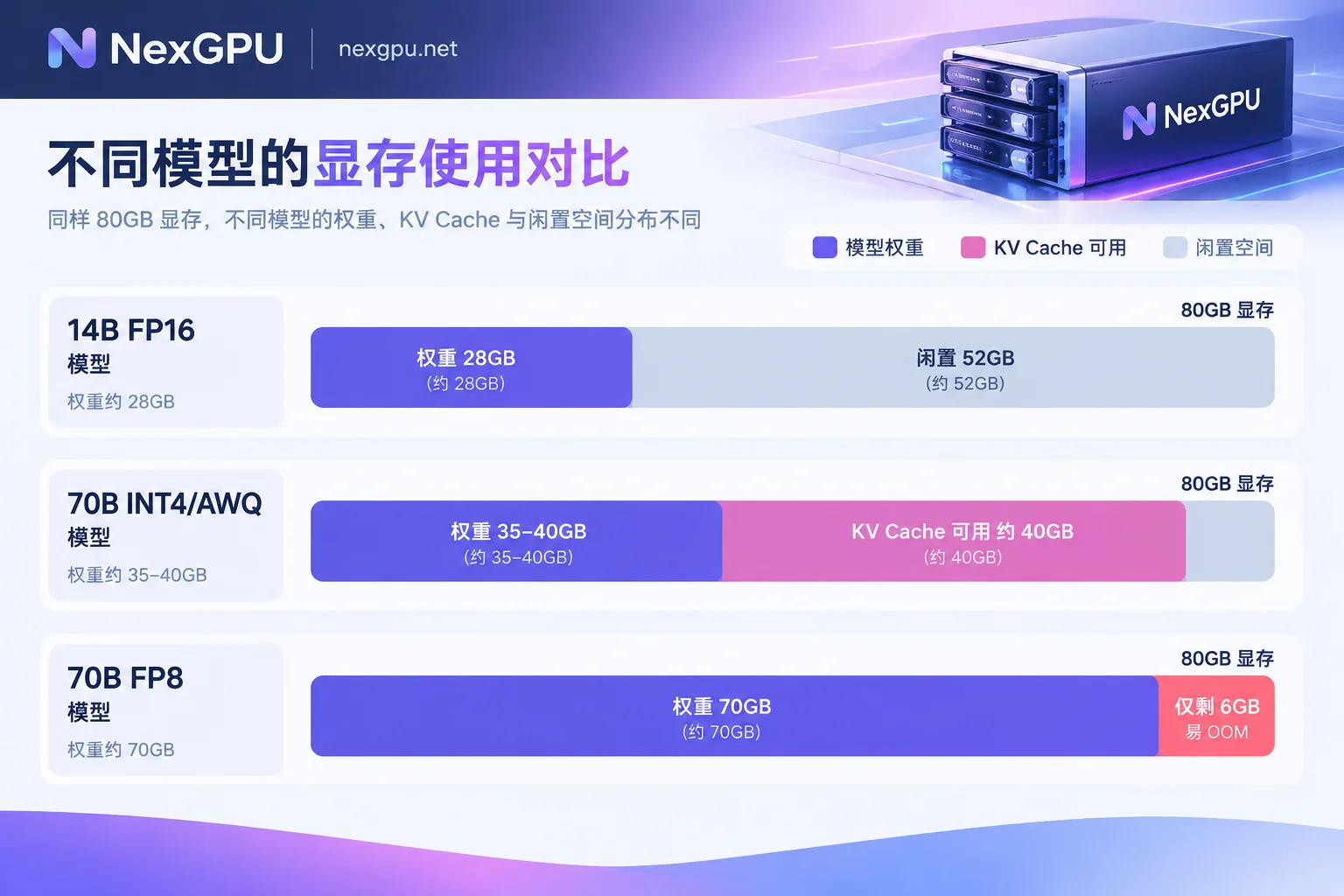
Conversely, a 70B model with INT4 or AWQ uses only about half the VRAM for weights, leaving ~40GB for KV Cache. This is exactly where the A100 80GB shines: a single card can handle more concurrency or process longer contexts.
Before Going Live, Validate with Your Own Load
The numbers above only help narrow the range. The final conclusion must be tested with your own model and request volume. Renting cards by the hour is convenient for this kind of validation—destroy after testing without occupying resources long-term.
- Choose two candidate cards by model. For example, L40S and A100 80GB, or RTX 4090 and L40S. If unsure where to start, check NexGPU's model-to-GPU guide, which lists recommended card types and VRAM thresholds by model.
- Deploy with the same inference image. On the image template page, select vLLM or TGI for one-click deployment. Use the same model files, quantization method, and startup parameters on both cards to ensure comparability.
- Apply load realistic to production. Stress test with concurrency and context lengths close to online traffic. Results from a single request are not very informative.
- Look at the right metrics. vLLM by default pre-allocates most VRAM for KV Cache, so nvidia-smi showing near-full VRAM doesn't mean it's actually insufficient. Pay more attention to the KV Cache capacity in startup logs, the maximum concurrency it can support, and throughput/latency during stress testing.
- Calculate cost per token. Cost per million tokens = hourly rental ÷ tokens generated per hour × 1,000,000. A card with a higher unit price may end up cheaper if its throughput is much higher. If A100's throughput isn't significantly ahead, your workload isn't yet leveraging its advantages.
If the test shows a latency issue rather than capacity, refer to How to optimize high inference latency for large models to tune parameters first before deciding whether to switch cards.
Watch Out for Costs During Testing
NexGPU bills only for compute, storage, and traffic, by the hour and metered by the second, with no minimum spend. When comparing two cards, a few points affect your final cost:
- Storage fees continue after shutdown. Model files and data disks remain, so storage keeps being billed.
- Only destroying the instance stops all fees. Destroy the card you no longer use promptly; just stopping is not enough.
- The unit price is locked at order time until destruction. Costs during testing are calculated at the price when ordered.
- Downloading large model weights consumes storage and may incur traffic fees. Plan which card to keep data on to avoid storing two copies.
After testing and deciding on A100 80GB, if you find a single card insufficient and need multi-card tensor parallelism or long-term stable resources, organize your model, concurrency, and context requirements before consulting. For details, see How to consult about enterprise GPU clusters and reserved instances.



Comments(0)