 NexGPU-算力租赁,GPU服务器,GPU云算力,AI服务器租用-新闻博客
When inference latency is high, don't rush to swap GPUs. First, break latency into two parts: time to first token (TTFT) and time per output token (TPOT, also called ITL). Slow first token usually occurs in the prefill stage, often due to long prompts or requests waiting in queue. Slow token generation usually occurs in the decode stage, commonly because of insufficient memory bandwidth or because ongoing requests are interrupted by new ones. These two types of bottlenecks differ, and their fixes differ; tuning parameters in the wrong direction often has no effect.
Below, we proceed in troubleshooting order: first measure, then rule out the most common deployment issues, then address slow first token and slow token generation separately, and finally consider multi-GPU.
Step 1: Measure Which Segment Is Slow
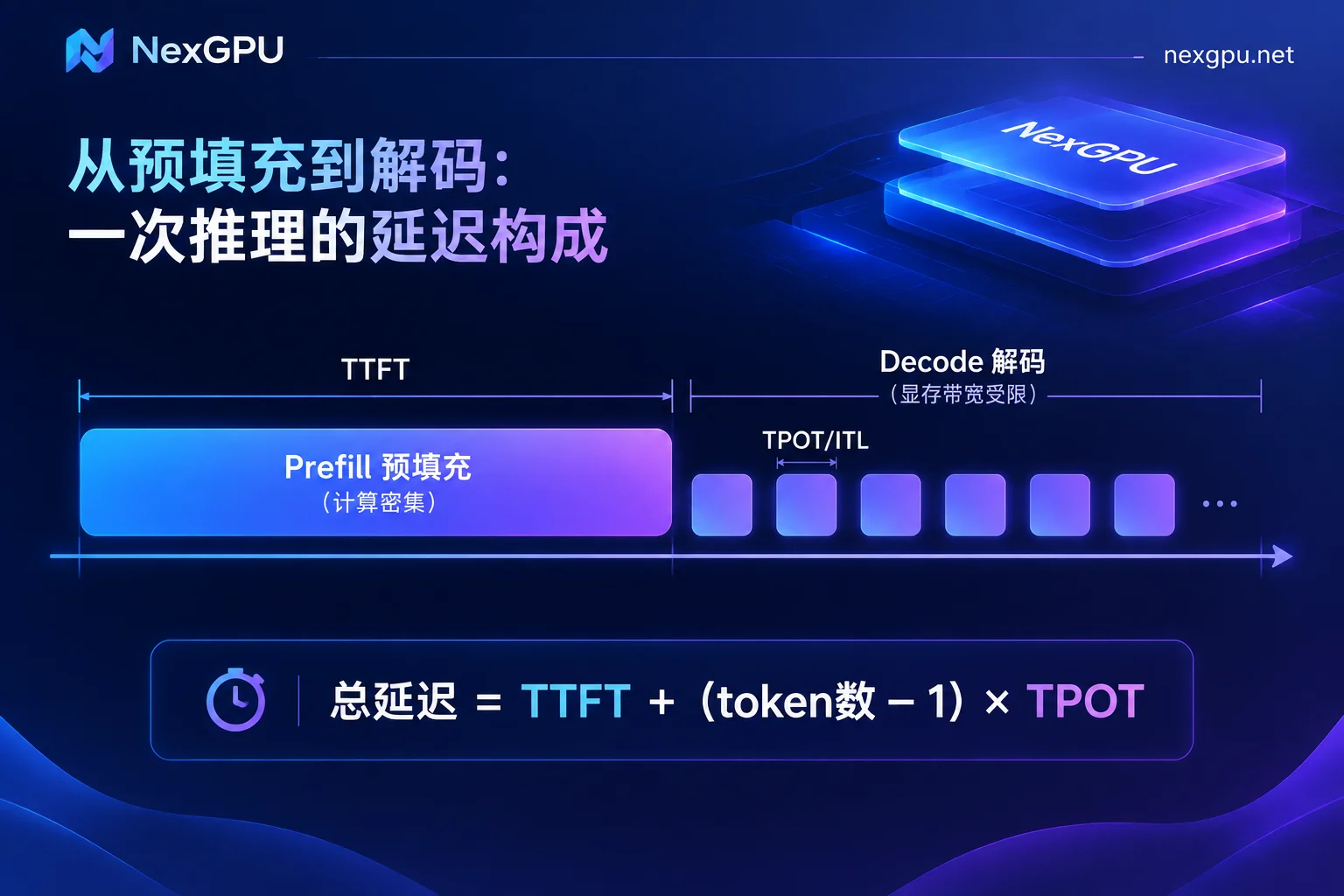
The end-to-end latency of a request can be roughly calculated as:
Total latency = TTFT + (number of generated tokens − 1) × TPOT
- TTFT: Time from sending the request to receiving the first token, corresponding to the prefill stage. The model must process all input in parallel at once, which is compute-intensive.
- TPOT / ITL: The interval between subsequent tokens, corresponding to the decode stage. Each generated token requires reading the model weights and the context's KV Cache from GPU memory once. The computation is minimal, and speed is mainly limited by memory bandwidth.
Measurement methods:
- Send requests via a streaming API, recording the time to first token and the intervals between subsequent tokens. Engines like vLLM have built-in metrics endpoints that can be integrated with Prometheus to directly view the distribution of TTFT and inter-token latency.
- During stress testing, fix three things: input length, output length, and concurrency. Change only one parameter at a time, otherwise results are not comparable.
- Measure both single request and target concurrency separately. Slow even for a single request versus slow only under concurrency require completely different approaches.
After measuring, you can usually match one of the following rows:
| Symptom | Likely Cause | First Try |
|---|---|---|
| Slow first token even for a single request, with a long prompt | High prefill computation | Trim input, prefix caching |
| Slow first token as soon as concurrency increases | Requests queuing | Continuous batching in a dedicated engine, tune scheduling parameters |
| Slow token generation even for a single request | Memory bandwidth saturated | Quantization, speculative sampling, switch to a higher-bandwidth GPU |
| Token generation stutters under concurrency | Long prompt prefill jumping the queue | Chunked prefill |
First Rule Out: Are You Still Serving with Transformers Directly?
If the service is built by wrapping a Web framework around HuggingFace Transformers' generate, this is usually the biggest problem. The native pipeline lacks several key capabilities:
- Continuous Batching: New requests don't have to wait for a full batch to finish before joining;
- PagedAttention: Manages KV Cache in pages, reducing memory fragmentation and allowing more concurrent requests;
- CUDA Graph: Reduces launch overhead per decode step.
For production services and formal stress testing, it's recommended to use an inference engine that packages these capabilities, such as vLLM, TGI, or TensorRT-LLM. Only after switching engines do the fine-tuning steps below become meaningful.
On NexGPU, you can directly select vLLM or TGI from image templates for one-click deployment, saving time on compiling and aligning CUDA versions. For how to choose templates and what pitfalls exist, see How to Choose Cloud GPU Image Templates.
Also confirm one thing: whether the model is fully loaded into GPU memory. If some layers are offloaded to CPU or system memory due to insufficient VRAM, latency will increase significantly, and no amount of parameter tuning later can compensate.
How to Handle Slow First Token (High TTFT)
1. First, shorten the input. Prefill computation grows with input length. In RAG scenarios, stuffing a dozen retrieved passages at once, or never truncating conversation history, will noticeably increase TTFT. Start by reducing the number of retrieved passages and compressing history. This step is free and has the most direct effect.
2. Enable Prefix Caching for fixed prefixes. If every request carries the same System Prompt, the same set of tool descriptions, or the same document, enable prefix caching (in vLLM, --enable-prefix-caching). This allows KV Cache for identical prefixes to be reused without recomputation. The longer the prefix and the higher the reuse rate, the greater the benefit; if every request starts differently, it has little effect.
3. If first token slows under concurrency, check for queuing. If single-request TTFT is normal but degrades under concurrency, requests are waiting for scheduling. In this case, first confirm continuous batching is enabled in a dedicated engine, then tune together with chunked prefill in the next section.
4. For long-context scenarios, consider compute power. Prefill is compute-intensive. If your workload genuinely processes very long inputs, GPU compute power directly affects TTFT.
How to Handle Slow Token Generation (High TPOT / ITL)
Slow token generation even for a single request: memory bandwidth saturated
In the decode stage, every output token requires reading weights and KV Cache once, so increasing core frequency doesn't help much. The key is to read less data or switch to a higher-bandwidth GPU.
- Weight quantization: Using INT4 (e.g., AWQ) or FP8 versions of the model reduces the amount of data moved per step multiple times, improving token generation speed. The cost is possible accuracy loss; compare output quality with your own business samples before deployment.
- KV Cache quantization: With long contexts, KV Cache takes a large proportion; quantization reduces bandwidth pressure and frees up VRAM. Formats like FP8 require support from newer GPU architectures; availability depends on the GPU model and engine version. Refer to the engine documentation.
- Speculative Decoding: Uses a lightweight draft model (or Medusa heads) to predict multiple tokens at once, then the main model verifies them in parallel. According to reports, in low-concurrency, single-user interactive scenarios, generation speed can improve by 1.5x to over 2x. However, in high-concurrency scenarios, it competes with main inference for compute and may reduce overall throughput. So it's better suited for services with low concurrency, such as chat assistants and personal tools.
- Switch to a higher-bandwidth GPU: Data center GPUs with HBM typically have higher memory bandwidth than consumer GPUs using GDDR. Consider switching GPUs only after trying quantization and speculative decoding and still not meeting single-request speed targets. For how much VRAM a specific model needs and which GPUs are suitable, query by model on the Model-GPU Selection page. For how to choose between two common inference GPUs, see Cost Comparison of L40S vs A100 for LLM Inference; for when consumer GPUs are clearly insufficient, see These Four Out-of-Bounds Signals.
Token generation stutters under concurrency: long prompts jumping the queue
When multiple requests run concurrently, if a long prompt arrives, default scheduling may process its prefill first, causing ongoing requests to stall, manifesting as fluctuating ITL.
In this case, use Chunked Prefill: split long prompts into chunks and schedule them mixed with decode requests in the same batch. In vLLM, the relevant parameter is --enable-chunked-prefill; some newer versions have it enabled by default. Refer to the documentation for your version. Along with adjusting max_num_batched_tokens:
- Setting it smaller reduces prefill occupancy per step, making decoding smoother and improving ITL (a reference starting point in reports is 512);
- Setting it larger advances prefill faster, improving TTFT and overall throughput.
The specific value has no universal answer; it depends on whether you care more about first-token or steady token generation. Adjust gradually based on stress test results.
When One GPU Isn't Enough: How to Split Across Multiple GPUs
If a single GPU lacks sufficient VRAM, or single-GPU latency hits a ceiling, and you want to reduce per-request latency, use intra-node tensor parallelism (TP) to split matrix computations across multiple GPUs for simultaneous processing.
Two things to note:
- TP heavily relies on high-speed interconnects between GPUs (e.g., NVLink). In ordinary PCIe or cross-node environments, setting TP too high will cause communication overhead to cancel out compute gains, possibly increasing latency. Before renting multi-GPU instances, confirm the GPU interconnect method.
- Pipeline parallelism (PP) mainly addresses insufficient VRAM and improves batch throughput, but does little to reduce per-request latency. If the goal is only latency reduction, PP is not recommended as a priority.
If you need multi-node or larger-scale deployment, it's best to organize your model, concurrency, and latency targets before communicating. See Requirements Checklist Before Consulting on Enterprise GPU Clusters.
Costs During Tuning
Stress testing and repeated parameter tuning require instances to stay running, and compute is billed by time. Two things to distinguish:
- Shutdown: Compute charges stop, but model weights and logs on disk remain, and storage charges continue. Suitable when you'll continue testing tomorrow.
- Destroy: All charges stop, but data is erased. Before destroying, transfer out stress test conclusions, configuration files, and any quantized models you want to keep.
For specific billing boundaries, see Does a GPU Instance Still Charge After Shutdown?
Summary of Troubleshooting Order
- Use streaming requests and engine metrics to distinguish whether TTFT or TPOT/ITL is high, and measure single-request and target concurrency separately;
- Confirm you're using a dedicated engine like vLLM, TGI, or TensorRT-LLM, and the model is fully loaded into GPU memory;
- Slow first token: trim input, enable Prefix Caching for fixed prefixes;
- Slow token generation: first quantize weights/KV Cache, then try speculative sampling in low-concurrency scenarios; for stuttering token generation under concurrency, adjust chunked prefill;
- If still not meeting targets after all the above, switch to a higher-bandwidth GPU, or enable tensor parallelism within a single node with NVLink.



Comments(0)