 NexGPU-算力租赁,GPU服务器,GPU云算力,AI服务器租用-新闻博客
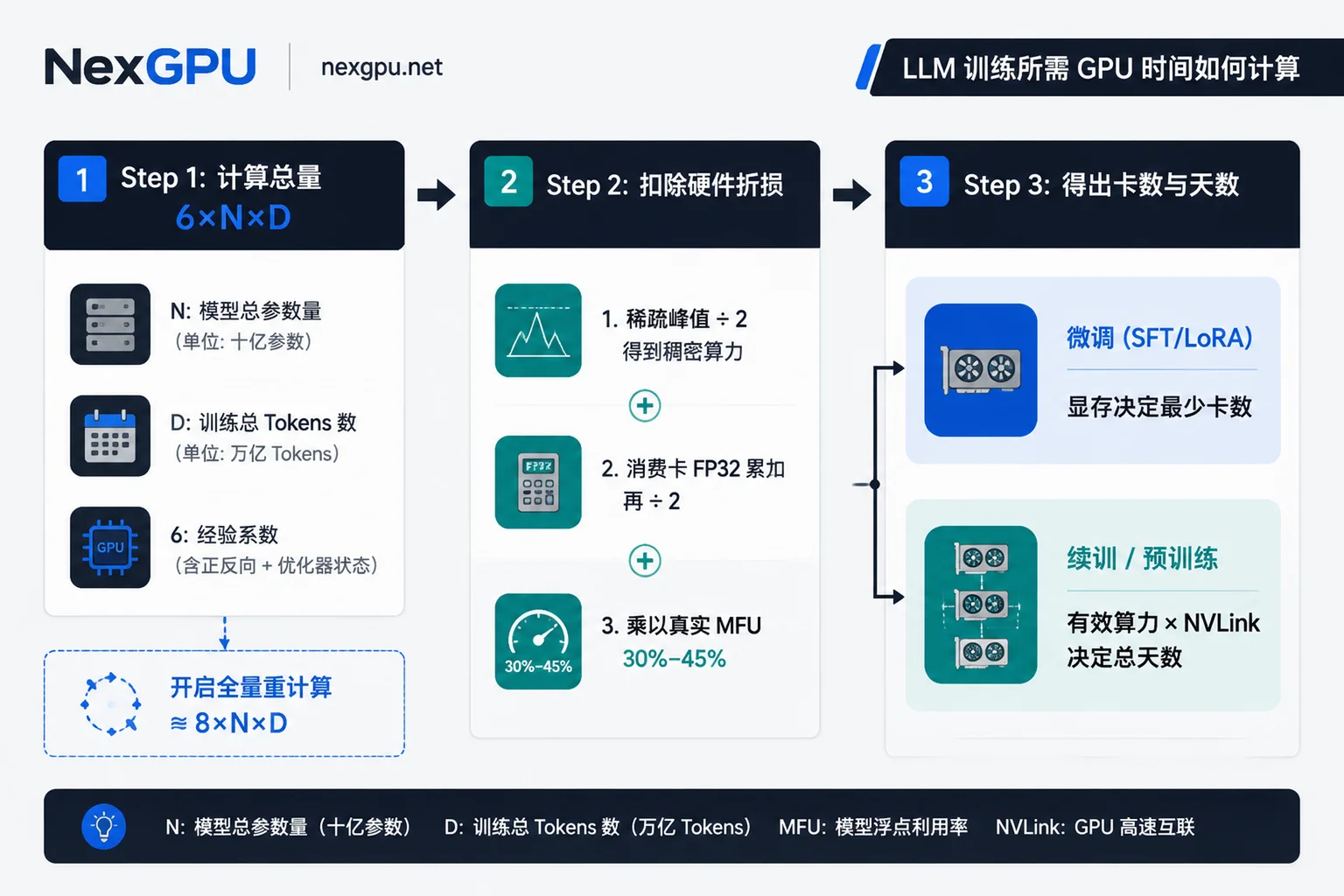
Bottom line first: To estimate how many GPUs and days are needed for training a large model, don't just look at memory size and peak compute on spec sheets. Instead, apply the core compute formulas:
- Total compute (FLOPs)
≈ 6 × N(模型参数量)× D(训练 Token 数) - Total GPU hours required
= (6 × N × D) ÷ (单卡稠密 BF16 算力 × MFU × 3600) - Actual training days
= 总 GPU 小时 ÷ (并行卡数 × 24)
Distinguish by empirical rules: Supervised fine-tuning (SFT / LoRA) uses a small number of training tokens (typically tens of millions to billions), so total compute often requires only a few to tens of GPU hours; here memory capacity determines the minimum number of GPUs. In contrast, continued pre-training (CPT) and from-scratch pre-training involve hundreds of billions to trillions of tokens; the real dense compute per GPU in FP32 accumulate mode, actual effective compute utilization (MFU, typically only 30%–45%), and inter-GPU interconnect (NVLink and RDMA) are the core variables that determine whether training takes 4 days or 2 months.
Below we break down the three most common hardware de-rating pitfalls that cause training schedule miscalculations, then use real examples to demonstrate how to calculate the most accurate GPU rental plan.
1. Why Estimating by GPU Marketing TFLOPS Always Fails: Three Real De-ratings
Many teams divide the peak TFLOPS from the GPU whitepaper by 6×N×D and conclude training will take only 2 days, but when they actually run it, it takes over a week. The problem usually lies in not deducting these three layers of compute de-rating:
1. Sparse Peak (2:4 Sparsity) Must Be Halved First
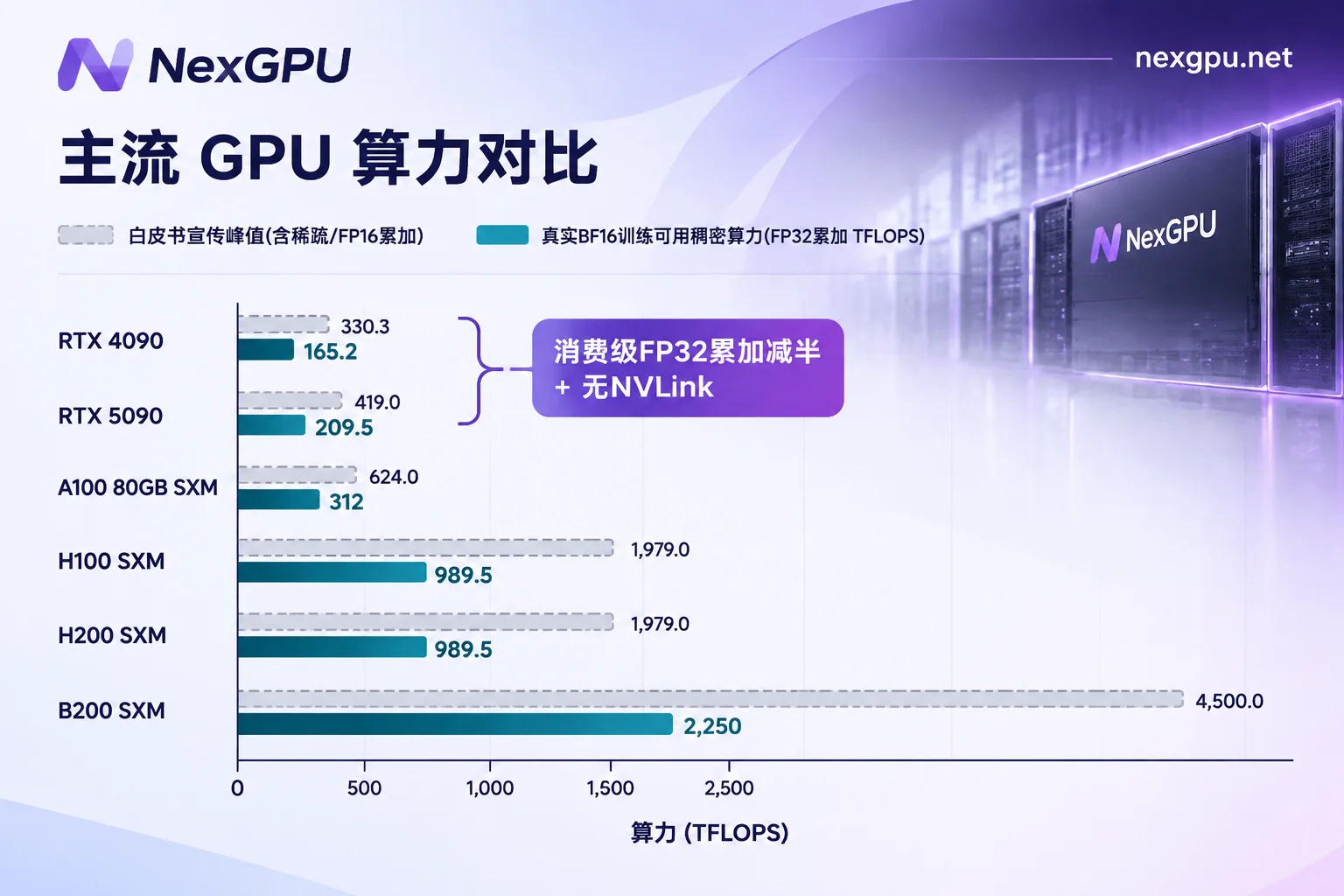
NVIDIA's data center spec sheets from Hopper to Blackwell include 2:4 structured sparsity in the peak TFLOPS by default. But most large model training uses dense matrix computations and does not enable structured sparsity pruning, so when calculating training throughput, the nominal sparse peak must be halved first: for example, H100 SXM has 989.5 TFLOPS dense BF16 (not the 1,979 often seen on spec sheets), and B200 has 2,250 TFLOPS dense BF16 (not 4,500).
2. Consumer GPUs Have Half Tensor Core Throughput in Training Mode
This is the most hidden pitfall when choosing RTX 4090 or RTX 5090 for model training. To prevent gradient update overflow, mainstream BF16/FP16 mixed precision training uses FP32 accumulators by default. NVIDIA limits Tensor Core throughput in FP32 accumulate mode to 50% of FP16 accumulate mode on consumer GeForce cards at the firmware and hardware level:
- RTX 4090: FP16 accumulate dense compute is about 330 TFLOPS, but BF16 (FP32 accumulate) commonly used in real training is only 165.2 TFLOPS.
- RTX 5090: FP16 accumulate dense compute is 419 TFLOPS, but in BF16 (FP32 accumulate) training path, both measured and spec-based figures are only 209.5 TFLOPS.
- Data center cards like A100 / H100 / H200 / B200: Not subject to this limitation; FP32 accumulate runs at full speed.
That is, looking only at whitepaper numbers, you might think RTX 5090 is faster than A100 (312 TFLOPS), but once in a real BF16 training loop, A100's raw compute per card is nearly 50% higher than RTX 5090, not to mention the multi-GPU synchronization gap due to lack of NVLink on consumer cards.
3. MFU Is Only 30%–45%, and nvidia-smi Utilization Is Not MFU
MFU (Model FLOPs Utilization) refers to the ratio of the model's actual effective 6ND computations per second to the hardware's theoretical peak. On large-scale data center clusters, well-tuned training jobs typically achieve MFU of 35%–45%; new frameworks or untuned cross-node communication often only reach 20%–30%. If renting multi-GPU consumer nodes without NVLink, relying solely on PCIe for gradient transfer, data parallelism and FSDP communication overhead further reduce effective utilization.
Also note two common misconceptions:
nvidia-smishowing 95% GPU utilization does not mean MFU is 95%: It only means the GPU is not completely idle, including time waiting for memory reads/writes and gradient synchronization; actual compute utilization may be less than 35%.- Enabling gradient checkpointing effectively lowers compute efficiency: To save memory, fully recomputing forward activations increases actual hardware compute from
6×N×Dto about8×N×D, effectively adding one-third to the time.
2. 2026 Mainstream Large Model Training GPUs: Real Compute and Positioning Comparison
The table below is unified under actual dense BF16 (FP32 accumulate) for training to help you directly compare compute and interconnect capabilities:
| GPU Model | Memory & Bandwidth | Dense BF16 (FP32 accumulate) | Dense FP8 | Inter-GPU Interconnect | More Suitable Training Stage |
|---|---|---|---|---|---|
| RTX 4090 | 24GB GDDR6X 1.01 TB/s | 165.2 TFLOPS | 330 TFLOPS (no native training ecosystem advantage) | No NVLink (PCIe 4.0) | 7B–14B model LoRA/QLoRA fine-tuning, small-scale experiments |
| RTX 5090 | 32GB GDDR7 1.79 TB/s | 209.5 TFLOPS | 838 TFLOPS (supports FP4/FP8) | No NVLink (PCIe 5.0) | ≤14B model SFT, ≤32B QLoRA fine-tuning, single-card rapid validation |
| A100 80GB SXM | 80GB HBM2e 2.04 TB/s | 312 TFLOPS | Not supported | NVLink 3.0 (600 GB/s) | Small teams BF16 full fine-tuning, 70B-class LoRA, budget-controllable CPT |
| H100 SXM | 80GB HBM3 3.35 TB/s | 989.5 TFLOPS | 1,979 TFLOPS | NVLink 4.0 (900 GB/s) | 2026 main training card, 7B–70B+ pre-training, CPT, FP8 mixed precision training |
| H200 SXM | 141GB HBM3e 4.80 TB/s | 989.5 TFLOPS | 1,979 TFLOPS | NVLink 4.0 (900 GB/s) | Ultra-long context training, large parameter models reducing tensor parallelism splitting and communication tax |
| B200 SXM | 180GB HBM3e ~8.00 TB/s | 2,250 TFLOPS | 4,500 TFLOPS | NVLink 5.0 (1,800 GB/s) | Large-scale pre-training and high-throughput post-training, single card can directly fit larger parameter scales |
When selecting, note two software stack constraints: First, A100 hardware does not support native FP8; using Transformer Engine FP8 to accelerate training requires at least Hopper (H100/H200) or Blackwell (B200). Second, Blackwell architecture (e.g., RTX 5090 sm_120, B200 sm_100) requires newer drivers and CUDA environments (RTX 5090 needs CUDA 12.8+); do not directly use old PyTorch images.
3. Three Real Training Tasks: How to Set Compute Budget and GPU Count?
Below we use three most common training scales to calculate time for different GPUs by formula, helping you schedule projects.
Scenario 1: Continued Pre-training (CPT) — 8B Dense Model Continuing on 50B Tokens of Industry Corpus
Many industry large model projects inject hundreds of billions of tokens of professional documents into an open-source 8B base. Total compute is:6 × (8 × 10⁹) × (50 × 10⁹) = 2.4 × 10²¹ FLOPs
Assume you rent an entire 8-GPU node, compare estimated completion time across GPU types:
- 8× B200 (BF16, at 40% MFU): Effective compute per GPU
900 TFLOPS, total requirement about741 GPU 小时, with 8 GPUs parallel only about 3.9 days (if mature FP8 training is enabled, further reduced to about 2 days). - 8× H100 SXM (BF16, at 40% MFU): Effective compute per GPU
395.8 TFLOPS, total requirement about1,684 GPU 小时, with 8 GPUs parallel requires about 8.8 days; if using Transformer Engine FP8 training, reduced to about 4.4 days. - 8× A100 80GB SXM (BF16, at 40% MFU): Effective compute per GPU
124.8 TFLOPS, total requirement about5,342 GPU 小时, with 8 GPUs parallel requires about 27.8 days. - 8× RTX 5090 (PCIe multi-GPU, BF16 FP32 accumulate): Limited by FP32 accumulate half-speed (209.5 TFLOPS) and lack of NVLink causing cross-GPU gradient synchronization overhead (MFU conservatively at 28%, effective per GPU about
58.7 TFLOPS), total requirement about11,357 GPU 小时, 8 GPUs need nearly 59 days.
As can be seen, for continued training tasks over tens of billions of tokens, consumer multi-GPU may seem to have low hourly rental, but stretched over nearly two months, not only is the total compute bill likely not advantageous, but it also slows R&D iteration by more than 6 times. At this point, using 8× H100 or B200 is the most time- and cost-effective approach.
Scenario 2: From Scratch Pre-training — 7B Dense Model on 1T Tokens, or MoE Architecture?
- Dense model: 7B parameters on 1T (
10¹²) tokens, total compute6 × 7×10⁹ × 10¹² = 4.2 × 10²² FLOPs. On H100 (BF16) at 40% MFU, about 29,480 GPU hours. Renting 8 H100s would take 153 days, obviously impractical; scaling to a 64-GPU or 128-GPU RDMA cluster (8–16 8-GPU nodes) can deliver in 10–20 days. - MoE (Mixture of Experts) model: The parameter count
Nin the formula should be replaced by the actually activated parameters per tokenN_active, not total parameters. For example, a MoE model with 30B total parameters and 3B activated per token has training compute close to a 3B dense model; but memory still needs to hold all 30B weights and corresponding optimizer states, so when selecting GPUs, do not allocate memory based on 3B (for more on multi-GPU memory accounting and interconnect rules, refer to GPU Selection for Large Model Training: Calculate Memory First, Then Determine Interconnect and GPU Count).
Scenario 3: SFT and LoRA/QLoRA Fine-tuning — 32B Model on 100M Tokens
Fine-tuning data is usually only tens of millions to hundreds of millions of tokens. For example, full-parameter fine-tuning of a 32B model on 100M (10⁸) tokens:6 × (32 × 10⁹) × (1 × 10⁸) = 1.92 × 10¹⁹ FLOPs
On 8× H100 SXM (BF16, 40% MFU), pure compute takes only about 13.5 GPU hours; with 8 GPUs parallel, training completes in less than 2 hours (plus data loading and evaluation, about 2–3 hours).
Why can't you just rent 1 H100 for 14 hours? Because 32B full fine-tuning in BF16 mixed precision (including AdamW optimizer states and gradients) requires about 512GB memory (not including long sequence activations), which a single card cannot hold; you must use an 8×80GB node to pool memory. If you switch to QLoRA or fine-tune only a few layers, a single H200/A100 80GB or dual RTX 5090 can fit, with very low compute cost (for specific fine-tuning frameworks and RL post-training GPU configurations, refer to How to Choose GPUs for Large Model Training in 2026: Memory Accounting and Multi-GPU Cost Practices from SFT to GRPO Reinforcement Learning Post-training and 2026 Large Model Fine-tuning GPU and Framework Selection Practice).
4. A More Accurate GPU Rental Process Than Formulas: 2-Hour Measured Throughput Then Scale Up
Official formulas are suitable for judging magnitude at project initiation (error typically 30%–50%), because sequence length, DataLoader IO, MoE routing load, and communication overlap all change real MFU. The most reliable engineering approach is to first do a 1–2 hour pilot run to directly measure your real code's tokens/s/GPU (training tokens per second per GPU):
- Rent a single target machine and run 200–500 steps: Fix your real sequence length, batch size, and framework configuration (DeepSpeed / FSDP / Megatron).
- Use measured speed to back-calculate total time: Skip MFU guessing, directly apply the formula:
总 GPU 小时 = 训练总 Token 数 ÷ (单卡实测 tok/s × 3600), then add 15%–20% margin for evaluation and checkpoint saving. - Confirm scaling efficiency before scaling up: If you need to expand from 8 GPUs to 32/64 GPUs across machines, be sure to verify cross-node RDMA bandwidth first, then lock in the large cluster budget.
If you need flexible transition from "single-machine pilot" to "multi-GPU scale-up", you can directly choose nodes on demand at Large Model Training GPU marketplace. NexGPU brings global distributed consumer GPUs (RTX 3090/4090/5090) and data center nodes (A100/H100/H200/B200) into one transparent list, with several design features particularly suited for training cost accounting and testing needs:
- Test before buy, zero startup threshold: Per-second compute metering, hourly pricing, no minimum rental duration or minimum spend; at order time the per-GPU hourly price is locked and total machine cost equals
单卡价 × 卡数; email registration allows viewing real-time node prices without identity verification and lengthy quota approval. - One-step memory and multi-GPU filtering: Filter machines by memory capacity, minimum GPU count, region, and bandwidth; when selecting a framework environment, the system automatically flags nodes with insufficient memory and explains why, avoiding OOM at startup.
- Image templates and custom CUDA freedom: Training category directly pre-installs PyTorch, JAX, TensorFlow, and templates like LLaMA Factory, Axolotl, Unsloth; when code uses RTX 5090 or B200 and locks a specific CUDA version (e.g., CUDA 12.8+), you can also fill in public or private Docker images and customize startup commands.
- Multi-node and enterprise-grade interconnect: Small to medium-scale training can directly filter and self-order 8-GPU A100/H100/H200 nodes on the marketplace (supporting DeepSpeed, FSDP, Megatron); for large-scale multi-machine pre-training or needing RDMA high-speed interconnect, dedicated compute pools, monthly reservations, and corporate invoicing, you can customize cluster topology through the Enterprise Solutions Channel.
Two reminders about long-running task billing and data: NexGPU stops compute billing immediately when an instance is stopped, but storage fees (per GB/month) continue; moreover, the platform does not provide automatic data backup; once an instance is destroyed, the disk is immediately released and cannot be recovered. It is recommended to configure automatic checkpoint saving for long-running training according to Cloud GPU Long Task Interruption Recovery and Checkpoint Setup, and synchronize weights to external object storage before ending training or destroying instances.
5. Ready-to-Use 30-Second GPU Selection Checklist
Before ordering a rental, check these four steps to avoid 90% of mismatches:
- Confirm task type: For SFT/LoRA with token count
< 1B, choose the cheapest GPU that can fit weights+activations (RTX 4090/5090 or a single A100/H200); for CPT or pre-training with token count≥ 10B, directly calculate compute cost with6×N×Dand use Hopper/Blackwell data center cards. - Align with real dense compute: Remove the 2:4 sparsity doubling from whitepapers; for consumer cards, use FP32 accumulate half-speed figures; schedule MFU conservatively at
35%first. - Check hardware interconnect and CUDA stack: Avoid multi-GPU PCIe nodes without NVLink for high-frequency multi-GPU synchronization; for Blackwell GPUs (RTX 5090/B200), confirm in advance that CUDA and PyTorch operator versions in the image match.
- 2-hour measured validation: Rent 1 target node, run 500 steps, record real
tokens/s/GPU, calculate final cost, then decide whether to run full speed by hour or switch to enterprise monthly cluster.



