 NexGPU-算力租赁,GPU服务器,GPU云算力,AI服务器租用-新闻博客
For multi-GPU inference throughput to nearly double, the added GPUs must be handling more requests, not computing the same request alongside the original GPUs.
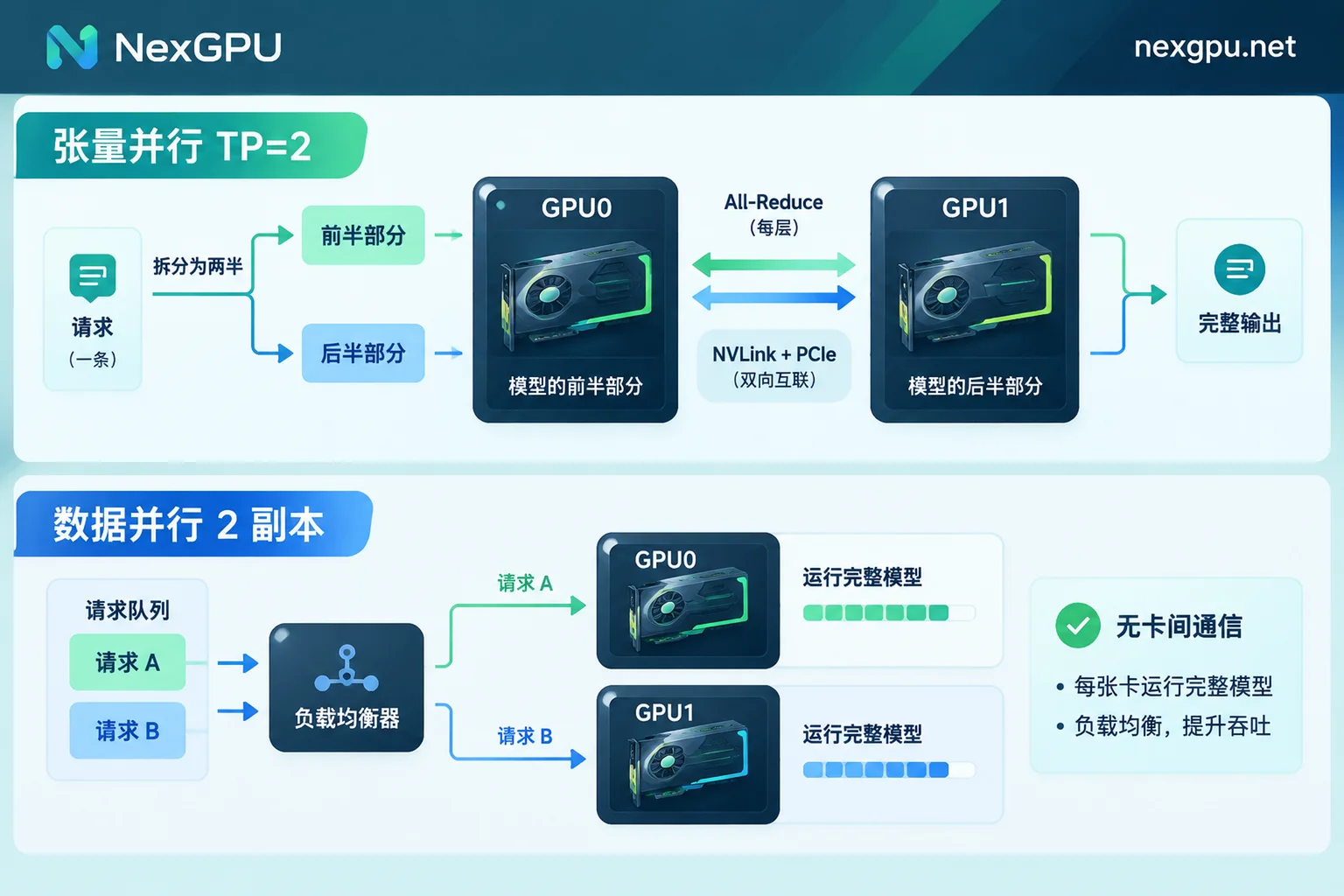
Many people switch from 1 GPU to 2 GPUs by simply changing tensor-parallel-size from 1 to 2. This is tensor parallelism (TP): two GPUs each compute half of the model, exchanging intermediate results at every layer. It primarily solves two problems: a model too large for a single GPU, and a single request being too slow. Its design goal is not to double throughput. If the model already fits on one GPU, changing to TP=2 and seeing throughput stay flat or slightly drop is normal.
To make throughput scale with the number of GPUs, you typically need data parallelism (DP), where each GPU runs a full model replica and a front-end gateway distributes concurrent requests across replicas.
First, Confirm Which Parallelism You're Using
Before troubleshooting, check whether your launch parameters or deployment method matches one of these:
- Tensor parallelism (TP): Multiple GPUs jointly host one model, and a single request is split across GPUs for computation. In vLLM, this corresponds to
--tensor-parallel-size. - Data parallelism (DP) / multiple instances: Each GPU (or group of GPUs) has a complete model replica and independently handles requests. You can use vLLM's data parallelism parameters, or use
CUDA_VISIBLE_DEVICESto start multiple instances separately with a load balancer in front. - Pipeline parallelism (PP): The model is split into segments by layers, each segment placed on different GPUs, and requests flow through sequentially. In vLLM, this corresponds to
--pipeline-parallel-size.
Only DP increases the number of replicas that can independently handle requests. Both TP and PP split a single replica across multiple GPUs, so they don't naturally multiply throughput.
Several Reasons Why Throughput Doesn't Increase
1. TP Requires Cross-GPU Communication at Every Layer
Tensor parallelism performs collective communication (All-Reduce / All-Gather) in both attention and MLP layers, and it does so at every layer. The interconnect bandwidth between GPUs determines the overhead:
- Data center GPUs with NVLink / NVSwitch have relatively low communication overhead, making TP benefits more pronounced.
- Consumer multi-GPU setups mostly rely on PCIe interconnect, where communication waits become significant, and the wider the TP, the faster the diminishing returns.
If you're renting a few consumer GPUs and enabling TP for a model that fits on a single GPU, there's a good chance throughput will drop rather than increase.
2. The Decode Phase Is Bound by Memory Bandwidth, Not Compute
During the decode phase of token generation, the bottleneck is mainly memory bandwidth. With few concurrent requests and small batches, extra compute from additional GPUs goes unused, so tokens/s won't double.
TP's help with throughput is actually indirect: combining memory from multiple GPUs allows a larger KV cache pool, so continuous batching can hold more requests simultaneously. This only manifests when concurrency is high enough. Stress testing with a single request or very low concurrency will severely understate multi-GPU gains.
3. Too-Wide TP Fragments Work per GPU
With large TP width and small request batches, each GPU gets very small matrix multiplications (GEMMs), failing to saturate the GPU's streaming multiprocessors (SMs) and reducing utilization. This often happens with 4-GPU TP on a medium model with only a few concurrent requests.
4. PP Has Sequential Dependencies and Scheduling Bubbles
Pipeline parallelism can fit very large models, but segments must pass data sequentially, creating idle waits (bubbles). It doesn't add parallel inference replicas, so PP alone won't multiply throughput.
Choosing Parallelism by Model Size
Model + KV cache fits on a single GPU: prefer multiple replicas (DP).
Replicas don't need collective communication during forward computation, making this the closest to linear throughput scaling. vLLM also recommends DP for scaling service throughput when single-GPU memory is sufficient. This is especially important on PCIe-connected consumer multi-GPU setups. The trade-off is that single-request latency won't decrease with added GPUs.
Model doesn't fit on a single GPU: use the smallest TP width that fits, then scale replicas.
For example, if two GPUs can just fit the model, set TP=2 instead of jumping to TP=4. Use the remaining GPUs to form a second TP=2 replica for DP. Place TP as much as possible between GPUs with NVLink.
More concerned with single-request latency (time to first token, token generation speed): TP is the right tool.
In this case, the low latency from TP is the desired outcome, and throughput not doubling doesn't mean misconfiguration. For specific latency tuning methods, see How to Optimize High LLM Inference Latency.
Model too large for one machine: consider PP.
The common approach is TP within a machine and PP across machines. Accept the bubble overhead from pipelining.
How to Test for Credible Conclusions
- Stress test with concurrency close to real workloads. Under low concurrency, the difference between TP and DP is masked, misleading you into thinking multi-GPU is useless.
- Record both throughput and latency. Throughput in tokens/s or req/s, latency in time to first token and time per token, because TP and DP often trade off—one wins latency, the other wins throughput.
- Compare both approaches with the same number of GPUs, e.g., test "TP=2 single replica" and "TP=1 dual replicas" on two GPUs, and choose based on your business goals.
- Watch KV cache headroom. While a single GPU can fit the weights, if there's almost no space left for KV cache, concurrency suffers—then TP expanding the memory pool might actually be more cost-effective.
For trade-offs between two mid-range GPUs and one large-memory GPU, see Can Two L40S Replace One A100?, which discusses this by bottleneck type.
Run This Comparison on NexGPU
The above comparison tests typically take a few hours. On NexGPU, you can deploy directly using vLLM and other image templates, with hourly billing, per-second metering, and no minimum spend. For how much memory different models need and which GPU to rent, check the official model-to-GPU guide.
One billing note: stopped test instances still incur storage fees; billing stops completely only after destruction. So destroy unused configurations promptly after testing, and save model files and stress test results separately if needed.
If testing shows you need multi-machine TP + PP, or long-running multi-replica services, contact NexGPU to evaluate multi-GPU solutions with your model, target concurrency, and latency requirements.



