 NexGPU-算力租赁,GPU服务器,GPU云算力,AI服务器租用-新闻博客
In the second half of 2025, many technical teams expected that with the delivery of H200 and Blackwell (B200) series chips, the rental prices of the NVIDIA H100, which has been on the market for years, would continue to decline. However, entering 2026, the global computing power market has taken a completely opposite curve.
According to data disclosed in 2026 by semiconductor research firm SemiAnalysis and multiple computing power price tracking indices, driven by the proliferation of multi-agent workflows, the explosion of native video generation applications, and the surge in calls to open-source weight models, the one-year lease and on-demand rental prices of H100 have rebounded by nearly 40% since hitting bottom at the end of 2025. What deserves more attention from R&D teams and computing power procurement is that the on-demand hourly rental price difference for the same H100 chip among different cloud service providers is as high as 3.8 to 4.7 times—traditional large public clouds (Hyperscalers) often quote 2 to 4 times that of specialized GPU computing power markets.
In 2026, where "one card is hard to find" coexists with "huge cross-platform price differences," teams can no longer just look at the nominal unit price when renting H100, but need to recalculate costs from three dimensions: hardware capability boundaries, cross-generation card comparisons, and billing mechanisms.
I. Why is H100 Still the Mainstream Computing Power Anchor in 2026?
Although H200 and B200 have been launched, H100 remains the data center-grade flagship card with the most mature software ecosystem adaptation and the best spot liquidity. What determines the rental value of a graphics card is not the "release year," but its cost per token output and training convergence time in current mainstream tasks.
The reason H100 (80GB HBM3) is difficult to be easily replaced by consumer-grade graphics cards or previous-generation cards in production environments lies in three hard indicators:
- Native FP8 Tensor Core Engine: H100's fourth-generation Tensor Core natively supports FP8 mixed-precision computing, with dense computing power approaching 1,979 TFLOPS (doubled in sparse mode). In mainstream 2026 vLLM or SGLang production deployments, enabling FP8 quantization has almost become standard practice—it can halve the weight memory usage and double inference throughput with almost no loss in model accuracy.
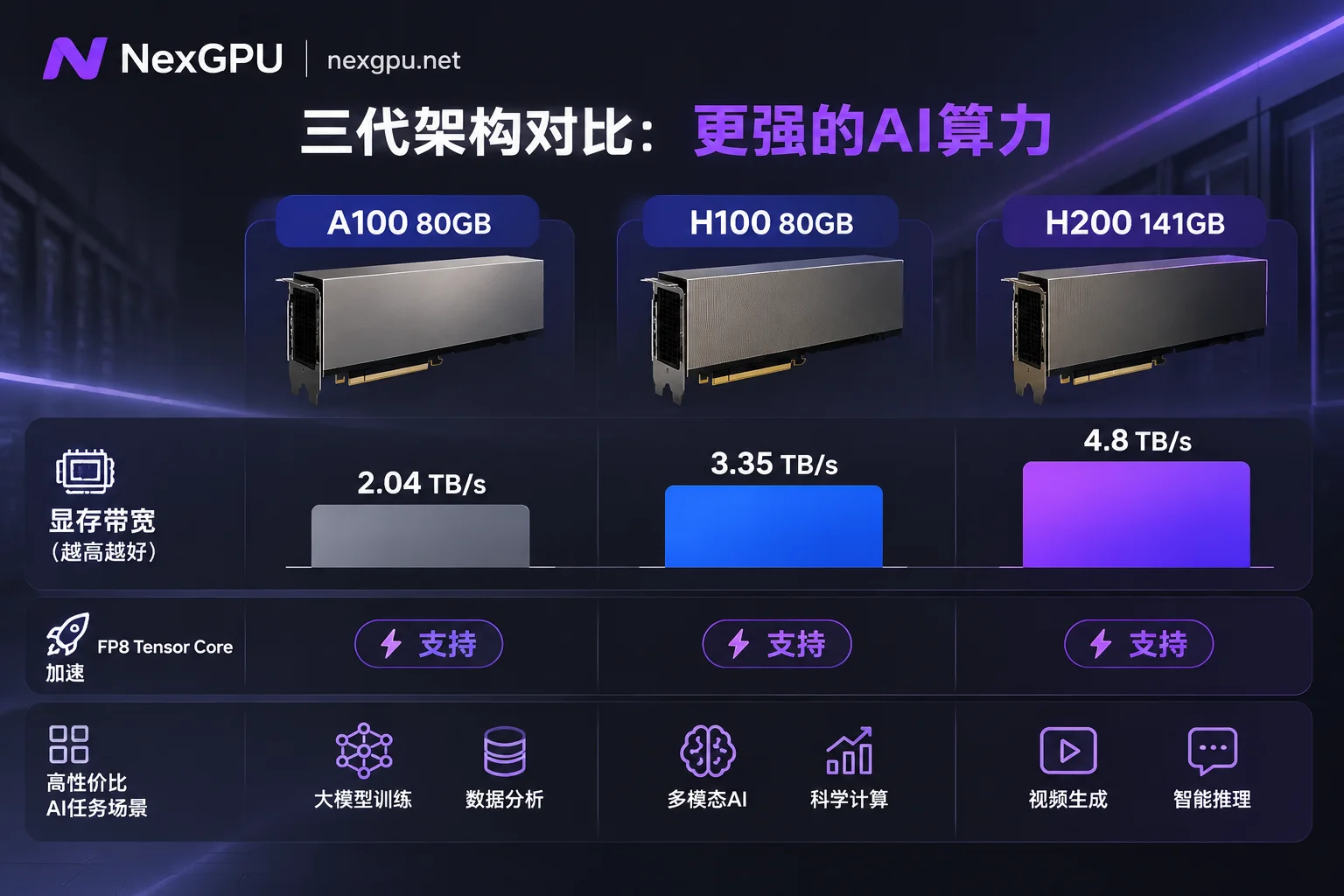
- 3.35 TB/s HBM3 Memory Bandwidth: The Decode (generation) phase of large model inference is a typical memory-bound task. Compared to A100 80GB's 2.04 TB/s bandwidth, H100 has an increase of over 60%, significantly reducing time to first token (TTFT) and time per output token (TPOT) in high-concurrency and long-context scenarios.
- High-Bandwidth Multi-Card Interconnect: In multi-card parallel training or tensor parallelism (TP) inference across cards for very large models, inter-card communication is often the throughput bottleneck. H100 nodes provide high-speed interconnect capabilities, enabling extremely high scaling efficiency when running DeepSpeed, FSDP, or Megatron distributed tasks.
II. Card Selection Decision: When Must You Rent H100? Comparison with A100 and H200
Facing the list of data center-grade graphics cards including A100, H100, H200, and B200, many developers easily fall into the trap of "blindly chasing the new" or "only picking cheap cards." Previously, when we discussed whether running inference on A100 80GB is wasteful, we analyzed the matching relationship between memory and computing power. When evaluating H100 rental, you can directly follow these three dividing lines:
| Comparison Dimension | A100 (80GB) | H100 (80GB) | H200 (141GB) |
|---|---|---|---|
| Memory Capacity and Type | 80GB HBM2e | 80GB HBM3 | 141GB HBM3e |
| Memory Bandwidth | ~2.04 TB/s | ~3.35 TB/s | ~4.8 TB/s |
| Native FP8 Acceleration | Not supported (mainly FP16/BF16/INT8) | Natively supported (Transformer Engine) | Natively supported (same Hopper architecture) |
| Most Cost-Effective Rental Scenario | Batch processing or traditional fine-tuning requiring 80GB memory but with moderate concurrency | High-concurrency FP8 online inference, full-parameter/LoRA fine-tuning of medium-to-large models, high-frequency multi-agent calls | Single card needs to fit 70B+ models and extremely large KV Cache, avoiding cross-card splitting for ultra-long context tasks |
1. When is upgrading from A100 to H100 actually more cost-effective?
Although H100's hourly unit price is higher than A100, in compute-intensive fine-tuning (see How to choose GPU for large model fine-tuning) and FP8 high-concurrency online inference, H100's actual throughput is often 2 to 3 times that of A100. This means a training task that originally required 10 hours of rental may be completed in 3.5 hours on H100 and then shut down—billed by the second and settled by the hour, the total bill per task is actually lower.
2. When to choose H100 and when to go for H200?
H200 and H100 share the same Hopper compute core, with the core differences being memory capacity (141GB vs 80GB) and bandwidth (4.8 TB/s vs 3.35 TB/s). If your 70B model in FP8 precision with the required KV Cache for your business can just fit into 80GB memory (or dual-card 160GB), renting H100 offers the best cost-performance; only when single-card memory overflow forces you to add more cards and inter-card communication costs are too high should you consider the H200 with 141GB per card.
If you are unsure how much memory your open-source model will occupy after quantization, you can directly consult NexGPU's Model Selection Guide, which lists the current versions, quantized memory thresholds, and recommended card types for mainstream text large models, video generation, multimodal vision, and AI Agent models.
III. H100 Rental Pitfalls: Four Accounts More Critical Than "Hourly Unit Price"
Against the backdrop of frequent price adjustments by cloud providers in 2026, we emphasized in the article How to Compare GPU Computing Power Prices of Mainstream Cloud Providers: never just look at the "lowest starting price" on the promotional page. When actually renting H100, the following four hidden aspects often determine the final financial expenditure:
1. Beware of Mid-term Price Increases and Preemptible Interruptions: Look for "Order Price Lock" and "Exclusive Instances"
Some low-priced H100s on the market are Spot instances, which may be reclaimed by the platform at any time during training; other platforms dynamically increase prices of existing instances following market supply and demand.
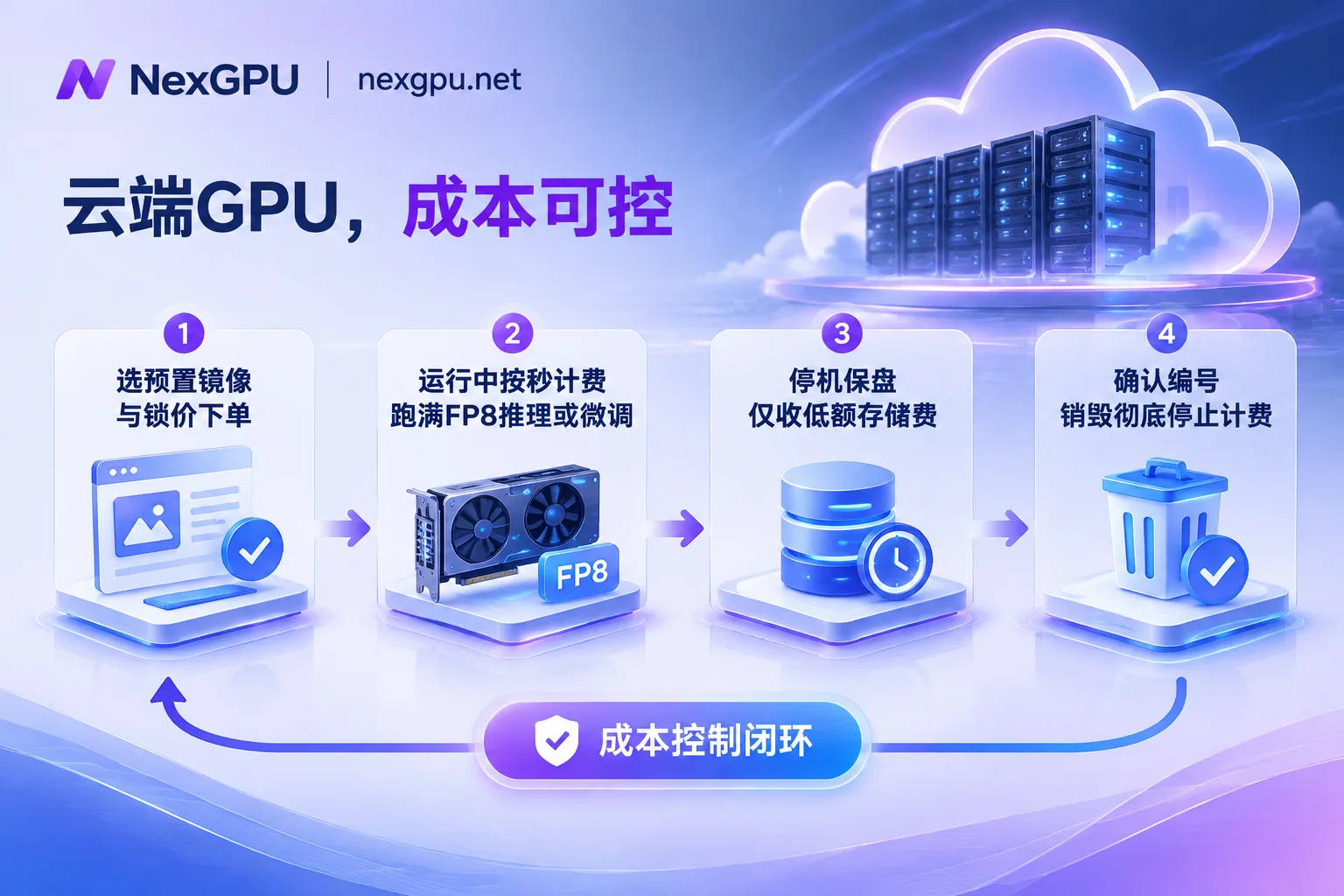
In the NexGPU Price Market, each row represents a real physical machine available for rent, with consumer-grade (RTX 4090, 5090, etc.) and data center-grade (A100, H100, H200, B200, etc.) listed separately. The core guarantee is: the unit price at the time of order will be locked until the instance is destroyed, unaffected by subsequent market fluctuations; and all instances are exclusive containers with no minimum spend, no setup fee, and no minimum rental duration.
2. Transparent Breakdown of Compute, Storage, and Traffic: Make Good Use of "Stop and Keep Disk"
Many teams spend a lot of time writing code, cleaning data, or debugging when renting H100 for development environments, and letting the expensive H100 idle is a huge waste.
NexGPU's billing rules are very straightforward, with only three items: compute, storage, and traffic, listed in real-time on the instance details page:
- Compute fee: Measured by the second and priced by the hour; billing starts only when the instance enters "running" state, and stops immediately upon stopping or destruction.
- Storage fee: Billed per GB/month, listed separately from the compute unit price when selecting a card in the machine list. When not running training, simply stop the instance to retain the disk and all environment data, during which only a very low disk storage fee is charged, and you can start it again at any time.
- Destroy only when absolutely certain: Destroying an instance requires entering the instance ID for confirmation, after which the disk is immediately released and all billing completely terminates (Note: The platform does not read or back up disk contents; please be sure to export important weights and data yourself before destruction).
3. Skip Quota Approval and Environment Hassles: Pre-built Images Ready to Use
Applying for H100 on traditional big cloud platforms often involves a lengthy process of enterprise real-name verification, submitting tickets for GPU quota, and waiting days for approval. At NexGPU, you can register with just an email, no real-name verification or quota application required, top-up supports Alipay and USDT (TRC20), and after registration you can directly view real-time prices and available nodes without binding a payment method (see Quick Start Guide).
To save the one or two hours typically spent on driver and CUDA compilation, NexGPU provides an out-of-the-box image template library:
- Large Model Inference: Pre-installed vLLM, SGLang, TGI, Ollama, providing OpenAI-compatible interfaces right after launch.
- Training and Fine-tuning: Pre-installed PyTorch, TensorFlow, JAX, as well as LLaMA Factory, Axolotl, Unsloth.
- Image, Video, and Speech: Pre-installed ComfyUI (supporting FLUX, video diffusion models), WhisperX, etc.
- Custom Private Images: If your project code strictly locks a specific CUDA version, you can also directly fill in your own Docker image (public or private repository), and customize startup commands and environment variables.
Even more thoughtfully, when you follow the process of "select environment first, then filter machines," the system automatically flags machines with insufficient memory and states the reason (see How to Choose GPU documentation), completely avoiding the embarrassment of beginners renting the wrong card and causing OOM (out of memory).
4. Smooth Evolution from Single-Card Validation to Multi-Card Cluster
Many R&D teams follow a typical path: first rent 1 H100 to run the pipeline and calculate per-step time, then quickly expand to 4-card or 8-card nodes for full training (refer to From Small-Scale Attempts to Ten-Thousand-Card Computing Power: How to Build Elastic GPU Clusters with Low Barriers).
In NexGPU's GPU market, you can directly filter by memory, price, region, reliability, bandwidth, minimum number of cards:
- Self-service ordering for multi-card nodes: High-memory multi-card nodes are rented as whole machines, with clear and transparent order amounts (price per card × number of cards), natively supporting mainstream distributed frameworks such as DeepSpeed, FSDP, Megatron.
- Direct development experience: Each instance comes with a public IP, SSH direct connection port (no jump server, default public key can be set), browser-based web root terminal, and one-click token-free Jupyter, plus reserved alternate ports for you to expose custom API services.
- Enterprise-grade customized solutions: If your team needs RDMA high-speed interconnect, private network and data isolation, reserved instances, monthly/annual price locks, or requires contracts, PO procurement, corporate payment, and invoicing, you can directly visit the Contact Sales page to get a dedicated computing cluster solution.
IV. Conclusion: Spend Your Budget on Truly Effective Computing Power
AI competition in 2026 has long entered the stage of competing on engineering efficiency and cost per token. Faced with the high demand in the H100 market and cross-platform price differences, the most rational strategy is: avoid the high premiums and cumbersome quota approvals of traditional public clouds, and leverage computing power markets that aggregate global distributed supply to rent with price locks on demand.
Whether you are an R&D team advancing private deployment of large models or AI fine-tuning, or evaluating computing power procurement for multi-card nodes, you can now go directly to the NexGPU GPU Market to filter real-time available H100 nodes and accelerate your next model iteration with elastic computing power billed by the second.



