 NexGPU-算力租赁,GPU服务器,GPU云算力,AI服务器租用-新闻博客
In the second half of 2026, a surprising signal emerged in the compute rental market: major cloud providers like CoreWeave have extended their NVIDIA A100 rental contracts all the way to 2029, directly debunking the "AI chips become obsolete in two years" myth that was popular in earlier years. Meanwhile, as the industry's compute focus shifts toward the era of inference-dominant workloads, A100 rental prices have not collapsed; instead, they have secured a solid position in the mid-to-high-end fine-tuning and high-concurrency inference markets.
While top-tier companies scramble for H200 and B200 to train next-generation ultra-large foundation models, most R&D teams, independent developers, and university research groups have found that for fine-tuning open-source models with 7B to 70B parameters, long-context inference, and multimodal generation tasks, the A100 remains the "sweet spot" data center GPU with the most mature software ecosystem and the highest cost-performance per unit of memory bandwidth.
However, when teams go to rent an A100, many still stumble: What's the real difference between 40GB and 80GB? For single-card inference, should you choose PCIe or SXM? How do you overcome less than 40% utilization when renting monthly? This article will sort out a complete A100 rental practical guide, from detailed hardware specifications and use-case matching to on-demand rental cost control.
I. Why Is A100 Rental Still the "Cost-Effective Workhorse" for R&D Teams in 2026?
Between consumer-grade GPUs (like RTX 4090, RTX 5090) and new-generation flagships (like H100, H200), the A100 sits in a very precise ecosystem niche:
- The hard threshold of 80GB HBM2e memory and 2TB/s bandwidth: Although consumer GPUs have impressive FP16 compute, their 24GB/32GB memory capacity and GDDR memory bandwidth easily trigger out-of-memory (OOM) errors or bandwidth bottlenecks when facing 32B/70B models or high-concurrency KV Cache. The A100 80GB provides about 2,039 GB/s of HBM2e memory bandwidth, remaining comfortable in memory-bound large model decode stages.
- Zero-pitfall software and operator maturity: From PyTorch, DeepSpeed, Megatron to vLLM, SGLang, LLaMA Factory, almost all mainstream open-source frameworks and low-level CUDA operators have been polished the longest on the Ampere architecture. When reproducing papers or deploying production services, the A100 rarely encounters bizarre operator compatibility errors.
- Avoid the premium of blindly chasing new models: If your tasks do not heavily rely on native FP8 features exclusive to Hopper/Blackwell architectures, but mainly use BF16/FP16 fine-tuning or INT4/INT8 quantized inference, renting an A100 often gets you the same capacity of 80GB high-speed memory at a significantly lower unit price than the new flagships.
II. Core Selection: 40GB or 80GB? PCIe or SXM?
When searching for "A100 rental" on the market, you will see two capacities: 40GB / 80GB, and two physical form factors: PCIe / SXM4. Many people only look at the three letters "A100" when choosing, resulting either in overspending and wasting budget, or in inter-GPU communication becoming a bottleneck.
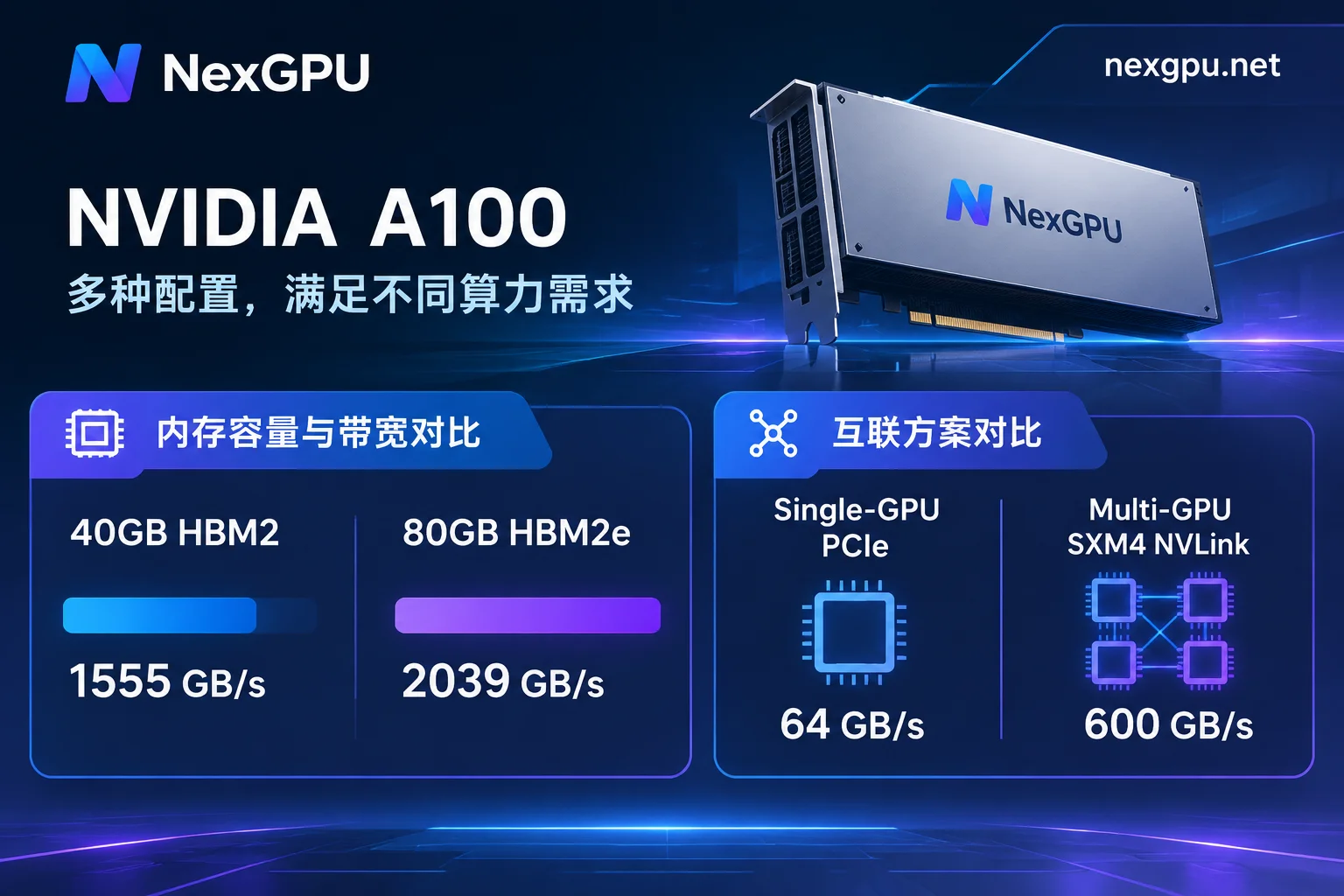
1. 40GB vs 80GB: More Than Just Doubled Memory Capacity
Many people think the A100 80GB is just the 40GB with twice the memory soldered on. In fact, the core compute units (6912 CUDA cores, 432 third-generation Tensor Cores, 312 TFLOPS FP16/BF16 peak) are exactly the same, but there are notable differences in memory generation and bandwidth:
| Comparison | NVIDIA A100 40GB | NVIDIA A100 80GB | Practical Impact on Selection |
|---|---|---|---|
| Memory Type | HBM2 | HBM2e | 80GB modules have higher frequency, better energy efficiency and throughput |
| Memory Bandwidth | ~1,555 GB/s | ~1,935 GB/s (PCIe) / 2,039 GB/s (SXM) | ~25%~31% higher bandwidth, directly determining inference token generation speed and large-batch training throughput |
| Single-Card Fine-Tuning Boundary | Suitable for 7B~13B model LoRA / lightweight fine-tuning | Can fit 70B model QLoRA fine-tuning or 30B-level model training on a single card | 80GB greatly reduces communication overhead from cross-card partitioning |
| Inference Concurrency Headroom | Running 70B INT4 (weights ~35GB~40GB) leaves almost no KV Cache headroom | Running 70B INT4 still leaves ~40GB memory for long context and high concurrency | For production-level high concurrency or long-text inference, 80GB is a must (see how to judge if A100 80GB is overkill for inference) |
2. PCIe vs SXM4: Depends on Whether You Are "Solo" or "Multi-Card"
- PCIe form factor is more cost-effective for single-card tasks: In single-card scenarios, the A100 80GB PCIe (300W power limit) and SXM4 (400W power limit) share the same GA100 core, with identical peak compute and only about 5% difference in memory bandwidth. If you only rent a single card for inference, single-card LoRA fine-tuning, or data-parallel tasks, the PCIe version offers excellent value.
- Multi-card large model training/tensor parallelism must consider interconnect: When tasks require tight collaboration of 4 or 8 cards (e.g., using DeepSpeed, FSDP, Megatron for multi-card full-parameter fine-tuning, or cross-card tensor parallel inference for very large models), PCIe Gen4's 64 GB/s bandwidth easily becomes a communication wall, while SXM4 via NVLink and NVSwitch can achieve up to 600 GB/s of full interconnect bandwidth.
III. Four Typical Scenarios: How Should You Rent an A100 for Your Task?
To avoid "a small horse pulling a big cart" causing task interruption, or "using a cannon to shoot a mosquito" wasting budget, you can match your needs to the following four high-frequency scenarios (if unsure about the memory footprint of specific open-source models, you can directly check NexGPU's model-to-GPU guide, which lists the memory thresholds for each mainstream model's current version and quantized variants):
Production-grade inference for medium-to-large open-source models (e.g., Qwen 32B/72B, DeepSeek series)
- Recommended configuration: Single or dual A100 80GB.
- Image pairing: Directly use the pre-built vLLM, SGLang, or TGI image templates; boot up and get a standard OpenAI-compatible interface immediately.
Large model fine-tuning (SFT / LoRA / QLoRA / DPO)
- Recommended configuration: For quick validation of 7B~14B models, choose a single A100 40GB/80GB; for fine-tuning 32B~70B models or multi-card full-parameter fine-tuning, it is recommended to filter for 2×, 4×, or 8× A100 80GB whole-machine nodes by minimum card count in the market.
- Image pairing: Choose fine-tuning images pre-installed with LLaMA Factory, Axolotl, Unsloth, or PyTorch to save the hassle of manually compiling CUDA and FlashAttention.
AI video generation and full-precision multimodal output
- Recommended configuration: Single A100 80GB. Compared to 24GB consumer GPUs that frequently offload weights to RAM when running video diffusion models or FLUX full precision with ControlNet, 80GB memory can keep the entire pipeline resident in VRAM (see AI video generation GPU selection guide for details).
- Image pairing: Use pre-built ComfyUI or AUTOMATIC1111 images.
Scientific computing, batch speech transcription, and data processing
- Recommended configuration: Choose A100 40GB or 80GB based on dataset size.
- Image pairing: Use pre-built RAPIDS, Jupyter, Whisper / WhisperX images, or, when project code strictly requires a specific CUDA version, directly fill in your own public/private repository Docker image and customize the startup command.
For memory requirements, recommended GPU types, and approximate costs in various vertical domains, you can also directly refer to the NexGPU scenario practices page.
IV. Breaking the "Monthly Idle Waste": How to Efficiently Rent A100 on NexGPU?
Industry survey data shows that many small and medium AI teams using traditional fixed monthly A100 rentals often achieve only 30%~45% actual GPU compute utilization due to data cleaning, code debugging, and nighttime idle time—nearly half of the rent evaporates.
On the NexGPU (nexgpu.net) compute marketplace, transparent GPU selection and on-demand billing rules allow you to spend every bit of your budget where it matters:
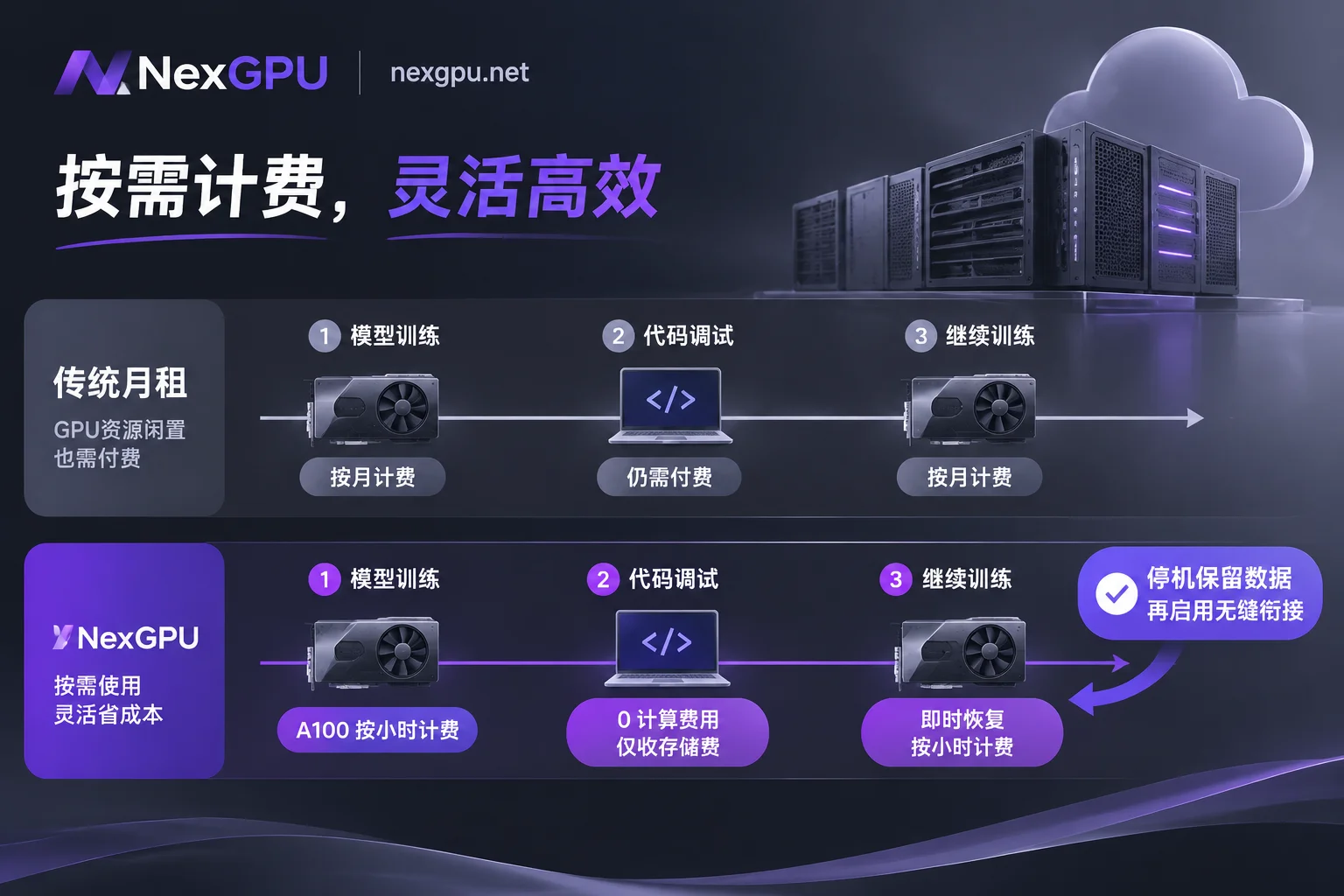
1. Real Machine Line-by-Line Price Comparison, Smart Environment and VRAM Guardrails
After entering the GPU market, data center GPUs (A100, H100, H200, B200, etc.) and consumer GPUs are listed separately, with each row representing a real rentable physical machine. You can directly filter by memory size, price, region, reliability, bandwidth, minimum card count, and each machine's compute unit price and disk unit price are listed separately (real-time prices and available nodes are subject to the official website).
More practically, if you select an image or model environment first and then filter machines, the system will automatically flag machines with insufficient memory and indicate the reason, preventing OOM from choosing the wrong card at the source (for selection details, see How to Choose a GPU). If you need multi-card distributed training, multi-card nodes support filtering by minimum card count and self-service ordering for the whole machine (order amount = single card price × number of cards).
2. Second-Level Metering, Price Lock, and "Stop-and-Keep-Disk" Savings
NexGPU's billing rules are extremely clean: the bill contains only compute, storage, and traffic three items, listed in real-time on the instance details page, with no activation fees, port fees, image licensing fees, no minimum spend, and no minimum rental period.
- Price lock at order: The compute unit price at the time of order is locked until the instance is destroyed, unaffected by market price fluctuations.
- Compute billed per second, priced per hour: Compute fees start only when the instance enters "Running" state, and stop immediately upon shutdown or destruction.
- Use "Stop and Keep Disk" to cut idle costs: Storage fees are calculated per GB/month (starting from image pull at creation, charged even when stopped, stop only upon destruction). This means when you finish a round of A100 fine-tuning and need half a day to analyze loss curves, adjust datasets, or modify code, you simply click "Stop" in the console. The expensive A100 compute fee drops to zero, while your hundreds of GB of model weights and environment data remain intact on disk, ready to start again when needed (for connection and daily management operations, see Instance Connection and Instance Management).
⚠️ Operations Pitfall Reminder: The platform provides exclusive containers and does not read or back up user disk contents, and instances do not support dynamic disk expansion or adding/removing port mappings after creation. Therefore, allocate sufficient disk space at once when creating an A100 instance; before confirming "Destroy" (requires entering the instance ID for confirmation), be sure to transfer important weights and logs via SSH direct connection, Jupyter, or the optional aaPanel visual panel, because destruction immediately releases the disk and is irreversible.
3. Zero-Barrier Instant Use and Enterprise-Grade Cluster Support
- Quick start for individuals and small teams: Register with just an email, no real-name verification, and no need to submit tickets and wait for A100 quota approval like traditional public clouds; after registration, you can view real-time prices of all nodes without binding a payment method, top up via Alipay and USDT (TRC20), and with sufficient balance, start multiple instances simultaneously without quantity limits (see Quick Start Guide and FAQ).
- Enterprise and large-scale R&D procurement: If your team, beyond self-service ordering of multi-card nodes in the market, also needs RDMA high-speed interconnect, private network data isolation, dedicated compute clusters, or wishes to arrange reserved instances, monthly/annual billing, contract signing, corporate payment and invoicing, PO procurement, you can directly contact the sales team to customize an enterprise solution.



