 NexGPU-算力租赁,GPU服务器,GPU云算力,AI服务器租用-新闻博客
First, estimate two time costs: the time to save a checkpoint and the time to recompute after an interruption. Combine these two costs and divide by the mean time between interruptions (MTBI) to get the industry-standard Checkpointing Badput metric. Configuring cloud GPU long-task interruption recovery and checkpoint settings is about keeping Badput within an acceptable range. Here's how to do it in four steps.
First, Two Calculations: Time to Write Checkpoints and Time to Roll Back After Interruption
Before configuring, clarify the interruption loss. The actual compute time you lose consists of two parts: the training time occupied by writing checkpoints (including sync blocking or async latency), and the time to recompute from the last checkpoint after an interruption. PyTorch officially combines these into Checkpointing Badput, defined as the percentage of "checkpoint write time + recovery recompute time" relative to the overall mean time between interruptions (MTBI). MTBI is the average time between two interruptions; preemptible instances might have MTBI in hours, while dedicated stable nodes might have it in days. (Official PyTorch blog "Distributed Checkpoint," https://pytorch.org/blog/distributed-checkpoint/)
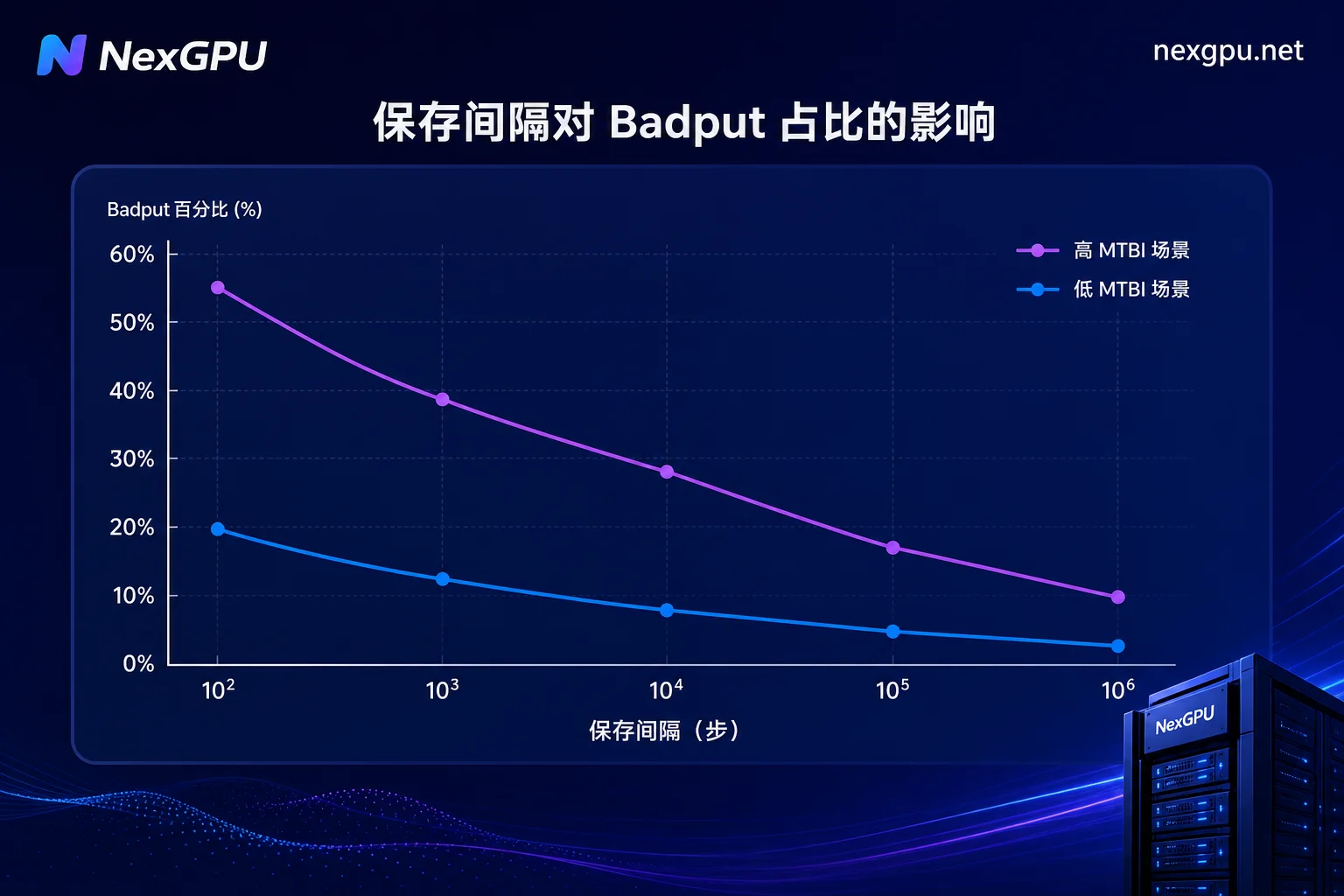
Understanding Badput tells you why "how often to save" can't be guessed: saving too frequently increases the proportion of time spent writing checkpoints; saving too sparsely inflates the time to recompute after an interruption.
Why Single-Rank Aggregated Saving Becomes Slower on Multi-GPU Long Tasks
Many teams still use torch.save to aggregate weights to rank0 and then write to disk. This single-rank aggregation approach shows clear problems as the number of GPUs increases and models grow: all shards must be aggregated into one process via communication, and the communication volume grows linearly with model size; the training main path is blocked during serial disk writes; and save time grows with model parameters. Teams that have hit these issues can refer to DeepSpeed Multi-GPU Distributed Training Pitfalls Guide.
PyTorch Distributed Checkpoint (DCP) adopts a Fully Parallel Saving (FPS) architecture, where each GPU rank writes weights and optimizer states to independent shards in parallel, along with a metadata file recording the global tensor layout. Officially, save time converges linearly as 1/N with the number of ranks, and supports re-sharding across different GPU topologies during recovery.
Step 1: Choose a Save Mechanism—What Parallel Shard Saving and Metadata Files Solve Respectively
The first step in configuring cloud GPU long-task interruption recovery and checkpoint settings is to decide on the save mechanism. It's recommended to use PyTorch DCP's Fully Parallel Saving instead of torch.save. DCP's core architecture is that each rank writes its own shard in parallel, while a metadata file records how global tensors are distributed across shards. Each checkpoint directory contains a metadata file that records the global tensor layout and shard files written by each rank; the exact file naming depends on your PyTorch version's actual output.
It's recommended to save both weights and optimizer states. Saving only weights prevents restoring Adam momentum, reducing training quality after recovery. Sharded saving can store both, at the cost of doubling the volume. If you save only weights, you need to assess whether rebuilding optimizer states is acceptable.
Action: Migrate checkpoints from torch.save to torch.distributed.checkpoint, and ensure each rank's save path is independent and writable in parallel.
Step 2: Set Save Frequency—Works Backward from MTBI and Single-Step Time
The second step, "how often to save," has no universal answer; you need to measure two numbers: the average interruption interval (MTBI) of your instances and the per-step training time. Then, based on your Badput target, work backward to determine the save interval in steps.
Official sources only define Badput; the derivation below is a simplified estimate from this article based on average rollback steps N/2, used for setting levels, not for external reporting.
Formula:
- Assume per-step time T (seconds) and save interval N steps, so the training time between saves is N*T.
- An interruption occurs at any time after a save point, so the average rollback steps are about N/2.
- Rollback time is about (N/2)*T, plus one save time S.
- Badput ≈ (S + (N/2)*T) / MTBI.
First, set an acceptable Badput upper limit for yourself (e.g., 5%; this threshold is determined by business cost tolerance, not an official recommendation), then solve for the upper bound of N using the formula above. Note that preemptible instances have short MTBI, so save more frequently; dedicated stable nodes can be more lenient.
Action: Run for 24 hours to collect instance interruption timestamps, estimate MTBI, and then calculate the save interval steps using the formula.
Step 3: Enable Async Disk Writes and Save Plan Caching to Move Checkpoint Writes Off the Training Path
After determining the save mechanism and frequency, the third step is to enable asynchronous disk writes and Save Plan Caching. With these two mechanisms, background checkpoint processing time can be reduced by up to 6.5 times (according to Databricks engineering blog and PyTorch official sources, https://www.databricks.com/blog/fast-fault-tolerant-pytorch-training-ai-runtime)。
- Save Plan Caching: Reuse the already-computed sharded save plan to avoid re-deriving tensor distributions on every save.
- Independent process async write: Move checkpoint serialization and disk writes to a background process to avoid GIL contention blocking the training main thread.
Async writes are not cost-free: you need to temporarily store a copy of the checkpoint (in GPU memory or RAM), which might trigger GPU Out of Memory Solutions. Also, if a crash occurs before the write completes, you might get a partial checkpoint. It's recommended to write to a temporary directory first, then atomically rename once fully written.
Action: Enable DCP's asynchronous save mode in your training script and monitor the background write completion latency.
Step 4: Recovery Drill—How to Resume an 8-GPU Checkpoint on 4 GPUs
The most unique issue in cloud GPU long-task interruption recovery is: Can a checkpoint saved during 8-GPU training be restored on 4 GPUs? The answer is yes, but only if the metadata is complete and the logical global tensors are consistent. DCP uses the metadata's global tensor layout for re-sharding, allowing you to change the number of GPUs and parallelization strategy during recovery.
When resuming, adjust the following:
- Gradient accumulation steps: When the global batch size changes, adjust accumulation steps to maintain an equivalent batch size.
- Learning rate schedule step: If the learning rate decays based on global steps, continue using the original step counter after recovery.
- Optimizer states and RNG/data loading progress: It's recommended to save RNG states and data loader shuffle seed in the checkpoint to ensure reproducibility of data order.
Recovery drill process:
- Train on 8 GPUs to step 1000 and save a checkpoint.
- Simulate an interruption (e.g., by killing the process).
- Start a 4-GPU training script, load the same checkpoint, and set world_size=4.
- Compare the loss and grad norm for the first few steps after recovery to ensure they are in the same magnitude as before the interruption, with no spikes—not bit-identical values; changes in reduction order when changing GPU counts cause normal numerical differences.
- Record the stable throughput after recovery; refer to GPU Utilization Optimization.
Note that re-sharding isn't unconditionally successful. It depends on complete metadata and consistent logical global tensors; if hyperparameters aren't adjusted correctly when changing partitioning strategies, local non-convergence may occur. Always drill on small-scale tasks first.
Additional Configuration for On-Demand and Preemptible Instances: Storage Paths, Reconnect, and Auto-Restart Sequence
The cost advantage of cloud on-demand and preemptible GPUs is realized only if interruption recovery is lightweight. With NexGPU's on-demand resources and pre-built templates, for example, you can preconfigure checkpoint directories, save frequency, and GPU count change policies into the startup configuration, making shrinking GPU count and continuing a routine action rather than an incident response.
- Place checkpoint directories on persistent storage (e.g., cloud disks), not on instance local disks.
- Keep the last N complete checkpoints and commit them atomically.
- Upon receiving a reclaim signal, first stop training, flush any pending async writes, then exit.
- The restart script automatically locates the latest complete checkpoint and re-invokes DCP's load interface with the new GPU count.
NexGPU offers a variety of GPU server models, on-demand usage, instant availability, and pre-built template deployment, allowing you to solidify these configurations as templates. Note: This section does not promise specific pricing or recovery time; actual performance must be tested.
Metrics to Record in an Interruption-Recovery Test
Configuration isn't reliability; you need to run a full "active interruption-recovery" drill and record the following metrics:
| Metric | Meaning | Recording Method |
|---|---|---|
| Single save time | Synchronous save duration | From log start to end of save |
| Async write completion delay | Time for background write to finish | Async callback timestamp |
| Checkpoint size | Sum of shards | Storage usage statistics |
| Rollback steps after interruption | Steps rolled back from last save point | Compare global step logs |
| Time from load to stable throughput | Time to reach stable performance after recovery | Monitor throughput curve |
| Badput ratio | (save + rollback) / MTBI | Calculated from above data |
These values must be self-tested because storage media, network, and instance specs vary greatly. There are no public benchmarks for NVMe or object storage write bandwidth; don't rely on external "experience values."
Configuration Checklist and Four Common Misconceptions
Finally, use this checklist to wrap up the four-step configuration:
- [ ] Checkpoint directory is on persistent storage, and each rank's shard path is independent
- [ ] Metadata file is saved along with weight shards
- [ ] Save interval steps calculated based on MTBI and per-step time
- [ ] Async disk writes and Save Plan Caching enabled
- [ ] Completed an 8-GPU save, 4-GPU recovery drill
Common misconceptions:
- The more frequent the saves, the safer: Wrong; frequency should match MTBI.
- Async writes have zero overhead: Wrong; they still consume memory/GPU memory for temporary copies.
- Changing GPU count requires retraining: Wrong; DCP supports re-sharding when metadata is complete.
- Saving only model weights is enough: Wrong; missing optimizer states can reduce recovery quality.
The above four steps form a complete set of cloud GPU long-task interruption recovery and checkpoint settings; any checkpoint scheme can only compress, not eliminate, interruption losses.
FAQ
How do I resume training from a checkpoint after an interruption?
Use DCP's load interface to load the latest checkpoint, restart the training script, and specify the same model configuration. The script will automatically re-shard based on metadata, restoring weights and optimizer states. Keep the global step counter unchanged and continue from that step.
How do I use PyTorch Distributed Checkpoint?
Core steps: initialize dist.init_process_group, build the model, then call torch.distributed.checkpoint.save to save and load to restore. Specify an independent shard path for each rank and ensure the metadata file exists.
torch.save is too slow for large model checkpoints. What should I do?
Switch to DCP's parallel sharded saving instead of single-rank aggregation. Save time decreases approximately linearly with the number of ranks, and enabling async writes and Save Plan Caching can further reduce time.
Can a checkpoint saved on 8 GPUs be restored on 4 GPUs?
Yes. DCP re-shards based on metadata; specify the new world_size during recovery. Adjust gradient accumulation steps and learning rate schedule, and ensure optimizer states and RNG states are saved.
If a preemptible instance is reclaimed, is the training wasted?
No. As long as the checkpoint directory is on persistent storage, the rebuilt instance will automatically load the latest checkpoint and continue. It's recommended to keep the last N checkpoints and commit them atomically to avoid corruption during writes.
How often should I save checkpoints for large model training?
There's no one-size-fits-all. Use MTBI and per-step time in the formula in this article: shorter MTBI requires more frequent saves; dedicated stable nodes can be more lenient. After initial configuration, adjust based on measured save time.
Does async checkpoint saving slow down training?
Async writes don't block training themselves, but they consume memory or GPU memory for temporary copies and may increase crash risk. After enabling, monitor save completion latency to ensure it's less than the save interval.




Comments(0)