 NexGPU-算力租赁,GPU服务器,GPU云算力,AI服务器租用-新闻博客
First, Ask Yourself What Task You Need to Run
Before renting a cloud GPU, clarify your delivery goal: Are you providing a high-concurrency API inference service externally, creating AI-generated images and videos yourself, writing code for fine-tuning experiments, or batch transcribing audio? The nature of the task directly determines the type of image template you need.
Production-grade large model inference or high-concurrency API services: Choose vLLM or TGI (Text Generation Inference) images directly. These images come pre-compiled with PagedAttention, FlashAttention, and CUDA operators, and support OpenAI-compatible interfaces, tensor parallelism (multi-GPU sharding), and continuous batching. This saves you the hassle of manually configuring acceleration libraries and driver alignment. Once started, they can be integrated into your business with guaranteed throughput and latency.
Quickly experience open-source large language models or integrate frontend tools (such as OpenWebUI, Dify): Choose an Ollama image. It includes built-in model download and quantization management, with simple commands, suitable for beginners and prototype validation running Qwen, Llama, and other GGUF format models. Single-GPU local debugging is sufficient without complex configuration.
AI image and video generation (such as SDXL, Flux workflows): Choose a ComfyUI image. It encapsulates the WebUI runtime environment, PyTorch, multimedia processing drivers, and core node dependencies. After startup, you can access the browser interface via port mapping, avoiding version errors when configuring Python virtual environments and graphics acceleration dependencies in a pure system image.
Audio tasks like speech transcription and subtitle generation: Choose a Whisper image. It pre-installs OpenAI Whisper and audio processing low-level dependencies (such as ffmpeg and specialized Python libraries), allowing direct GPU batch transcription without manually resolving system-level audio codec dependencies in the cloud.
Deep learning algorithm development, LoRA/full-parameter fine-tuning, custom code experiments: Choose a PyTorch or CUDA base development image. These retain standard Python and driver environments, with no pre-installed specialized business services occupying ports and VRAM, and support JupyterLab or SSH direct connection, allowing free installation of pip dependencies or building training pipelines.
Pitfalls of Choosing the Wrong Image
CUDA driver version mismatch: Manually compiling high-difficulty inference libraries (such as vLLM, TGI) from source on a pure PyTorch image can consume hours due to CUDA/C++ compiler version conflicts, wasting compute rental fees. In such cases, directly choosing a pre-compiled specialized image is more convenient.
Environment pollution and dependency conflicts: Performing unrelated complex large model algorithm secondary development on a deeply customized application image (such as an image generation-specific image) can easily cause Python package version conflicts, leading to high debugging costs.
Time-consuming compilation of complex low-level dependencies: Acceleration libraries like FlashAttention and xFormers require specific CUDA versions and compilation toolchains. Compiling them yourself is not only slow but may also fail. Choosing the right image gets you up and running in one step.
Cost Boundaries of Stopping and Destroying
On hourly billing platforms like NexGPU, image templates can quickly run tasks after startup, but cost management requires attention:
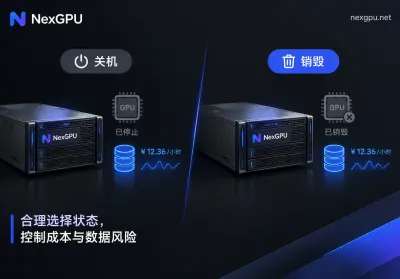
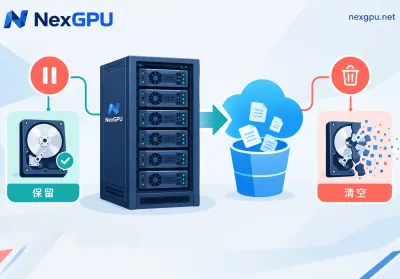
- Stop state: Compute fees stop, but disk storage remains occupied and continues to accrue charges. If you still need model weights and generated results, stopping is reasonable; if not, stopping won't save you storage fees.
- Destroy: Completely terminates all costs, including storage. Remember to back up data before destroying; after destruction, both the instance and data are gone.
- Data persistence: Plan storage paths for model weights, training checkpoints, and generated results before starting the task. If the data volume is large and needs to be reused across instances, back it up to object storage or locally in advance to avoid continuous storage fees from forgetting to destroy the instance.
NexGPU's bill only includes compute, storage, and traffic, with the order price locked until destruction. If you're unsure which GPU or image suits your task, you can first check the pre-installed environment list on the Image Template page, or refer to the GPU Selection Guide by Model to determine VRAM requirements before choosing an image.
Summary in One Sentence
Choose the right image, and your task runs quickly, with fewer compilation pitfalls and clear costs. For business inference, choose a throughput engine; for creative image generation, choose a pre-installed graphical interface; for code development, choose a clean framework image. Stopping only stops compute fees; destroying stops everything, so back up data in advance.


Comments(0)