 NexGPU-算力租赁,GPU服务器,GPU云算力,AI服务器租用-新闻博客
When comparing GPU prices across cloud providers, the most common mistake is looking only at the hourly rate shown on the console. The actual amount on your bill is the total cost of a task from startup to data cleanup:
- Compute is billed by runtime duration;
- Storage is billed by capacity and retention duration;
- Egress traffic is billed by the amount of data transferred out.
There are also thresholds not written in the unit price, such as whether you need to rent a whole machine, or whether you need to sign a contract to get a discount.
So the comparison should follow a different order: first determine what GPU the task needs, how long it runs, how long data is retained, and how much data will be transferred out, then use these numbers to apply each provider's billing rules.
Beyond Unit Price: What Else Is on the Bill
For comprehensive large clouds like AWS and Alibaba Cloud, bills are itemized:
- Compute instances: The GPU type determines the bulk of this item. On-demand instances are billed by the hour or by the second.
- Cloud disks or block storage: System disks and data disks are continuously billed by configured capacity. AWS EBS volumes are still billed after an instance is stopped, until the volume is deleted. Alibaba Cloud stopping an instance only stops the compute charges for vCPU and GPU; unreleased cloud disks continue to incur charges.
- Egress traffic: Data transferred from an instance to the public internet is billed separately, such as downloading generated results or providing external APIs.
- Snapshots and backups: Space occupied by snapshots is billed separately.
Among these, storage is the most easily underestimated. Suppose your instance has a large disk attached, containing several model weights. After the task finishes, you shut down and leave, and compute indeed stops, but this disk is billed every day. Tens to hundreds of GB of models and datasets left for weeks can lead to costs exceeding expectations. For a capacity-times-duration estimation method, see How to Calculate Cloud GPU Storage Fees.
Egress traffic depends on usage. If you only train within the instance and finally copy out a small checkpoint, traffic is minimal. If you use the instance as an external inference service, or frequently pull generated videos and model files back to local, you need to estimate this item separately.
On-Demand, Contract, and Minimum Rental Units
On comprehensive large clouds, the on-demand price for the same GPU is usually higher. To get significant discounts, you generally need to commit to annual/monthly plans or long-term commitments like Savings Plans. Teams with stable workloads that can fully utilize resources long-term are suited for this. For those who only want to run experiments for a few days, signing a contract means prepaying for hours that may go unused. Which to choose depends on whether the task can be interrupted and the utilization rate. For detailed judgment, see Spot Instances vs Reserved GPU Instances: Which Saves More.
Professional GPU clouds like CoreWeave mainly price by bare-metal nodes or GPU instance hours, and some platforms waive egress traffic fees for object storage. However, high-end training GPUs like H100, H200, and B200 are mostly rented as 8-GPU whole-machine nodes or preferentially supplied to long-term reserved customers. If you only want to use one GPU for development testing or lightweight inference, the threshold and scheduling flexibility on such platforms are limited. The per-GPU price may seem reasonable, but when the minimum rental unit is 8 GPUs, you pay for the ones you don't use.
Additionally, some platforms require real-name verification or quota application before opening a GPU instance, which affects how quickly you can start running tasks. See Do You Need Real-Name Verification and Quota Application to Rent GPUs.
GPU Type Often Has a Bigger Impact on Price Than Platform
Switching to a different tier of GPU on the same platform often results in a larger price difference than switching platforms.
- RTX series consumer-grade GPUs: Suitable for single-GPU image/video generation (e.g., ComfyUI), small-parameter model fine-tuning, and inference testing, with low cost per unit of compute.
- Data center GPUs like A100, H100, H200: Have large VRAM, ECC, and high-speed interconnects like NVLink/NVSwitch, with much higher unit prices. Their value is mainly in multi-GPU distributed training and large-model inference with long contexts and high throughput.
If your task can fit on one consumer-grade GPU, comparing H100 prices across platforms is not very meaningful; you should first choose the right GPU. For when consumer-grade GPUs are truly insufficient, see When Are Consumer-Grade GPUs Not Enough.
Put Several Providers on the Same Basis
It is recommended to prepare the numbers in the following order before filling in each provider's pricing page:
- Determine GPU type and count: Based on model parameter size, precision, and context length, determine the VRAM threshold and confirm whether a single GPU is sufficient.
- Estimate actual runtime: Besides ideal training time, include environment debugging, model downloading, and error reruns. For short tasks, the difference between per-second and per-hour rounding is noticeable.
- Estimate storage capacity and retention days: Add up system disk, model weights, datasets, and output results. Then think about whether to retain the environment after the task ends and for how long.
- Estimate egress data volume: How much of the results will be pulled back locally, and whether external services will be provided.
- Check thresholds: Is the minimum rental unit a single GPU or a whole machine? Are there minimum spending or contracts? Is quota application required?
- Calculate total cost: Compute unit price × runtime + storage unit price × capacity × retention duration + traffic unit price × egress volume, plus snapshot fees if used. Calculate for each provider using the same set of numbers, then compare.
Two points to note:
- Discounts and inventory for spot or preemptible instances fluctuate by region and time; refer to real-time information on the launch page.
- Contract discounts should be calculated based on the duration you are sure to fully utilize, not ideal scenarios.
Different Tasks, Different Comparison Focus
- First-time renting GPUs for image generation or running open-source model experiments: Focus on whether single-GPU hourly rental is available, whether there is a minimum spend, and how to stop storage after running. Such tasks are short, and the impact of minimum rental thresholds and idle storage is usually greater than small differences in unit prices.
- Fine-tuning and continuous inference: Once the workload is stable, compare on-demand and reserved. For inference services, especially estimate egress traffic.
- Multi-GPU distributed training: The focus is on inter-node interconnect, whole-machine supply, and contract terms; per-GPU hourly price is only a reference. Before contacting vendors, you can prepare a requirements list. See How to Consult About Enterprise GPU Clusters and Reserved Instances.
How to Calculate This on NexGPU
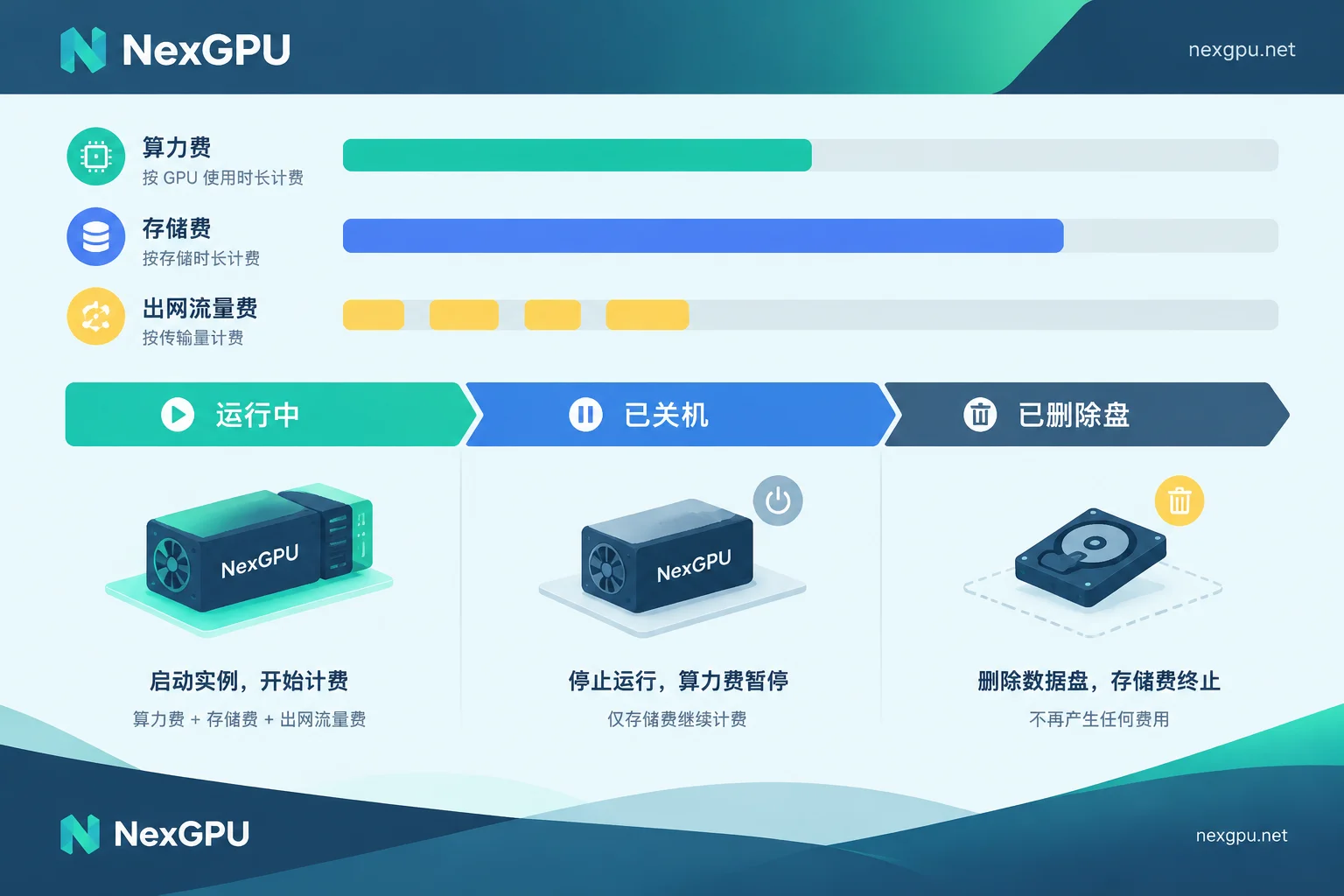
NexGPU bills by the hour and per second, with no minimum spend and no contract required. GPUs range from consumer-grade to data center-grade. The bill has only three items: compute, storage, and traffic. You can directly apply the formula from step 6 above:
- After shutdown, compute billing stops, but storage is still billed;
- After destroying the instance, all three fees stop;
- The unit price is locked at order time and remains unchanged until destruction.
The specific process has two steps. First, confirm which GPU tier your model needs in the Model-to-GPU Selection Guide, then check the current unit price and available nodes for the corresponding GPU type on the Pricing Page, and plug your runtime and storage retention time into the formula. After the task is done and data is exported, remember to destroy the instance; if you only shut down, storage fees will continue to accrue.



Comments(0)