 NexGPU-算力租赁,GPU服务器,GPU云算力,AI服务器租用-新闻博客
When splitting a model across multiple GPUs, the choice between tensor parallelism (TP) and pipeline parallelism (PP) mainly depends on two things: whether the model can fit on a single GPU, and how the GPUs are connected. Here's the conclusion first:
- If it fits on one GPU, don't split it. The criterion is that after weights and context KV cache, 20–30% of GPU memory remains. To handle more concurrency, launch multiple single-GPU instances with data parallelism rather than introducing any model-splitting overhead.
- Single machine with multiple GPUs and NVLink between them: prefer TP, set PP to 1.
- Single machine with multiple GPUs but only PCIe, or need to span machines: if memory truly forces splitting and request concurrency is consistently high, consider PP.
- Model too large for one machine: use TP within a machine and PP across machines—a common combination for large model deployment and training.
Below we explain the rationale for each decision and what to confirm before proceeding.
Where each parallelism splits
Tensor parallelism splits within layers. It divides the weight matrices of attention and MLP in each layer by row or column, with each GPU computing one part. After each layer, all GPUs perform a collective communication such as All-Reduce to combine results. The more layers, the more communication steps, and each step waits for the slowest GPU.
Pipeline parallelism splits between layers. It divides the model into several consecutive stages by layer—e.g., first 20 layers on GPU 1, next 20 on GPU 2. GPUs only exchange activations at stage boundaries via point-to-point communication, with much lower volume and frequency than TP. The cost is that requests must pass through stages sequentially; while earlier stages compute, later stages may idle—this idle time is called a "bubble."
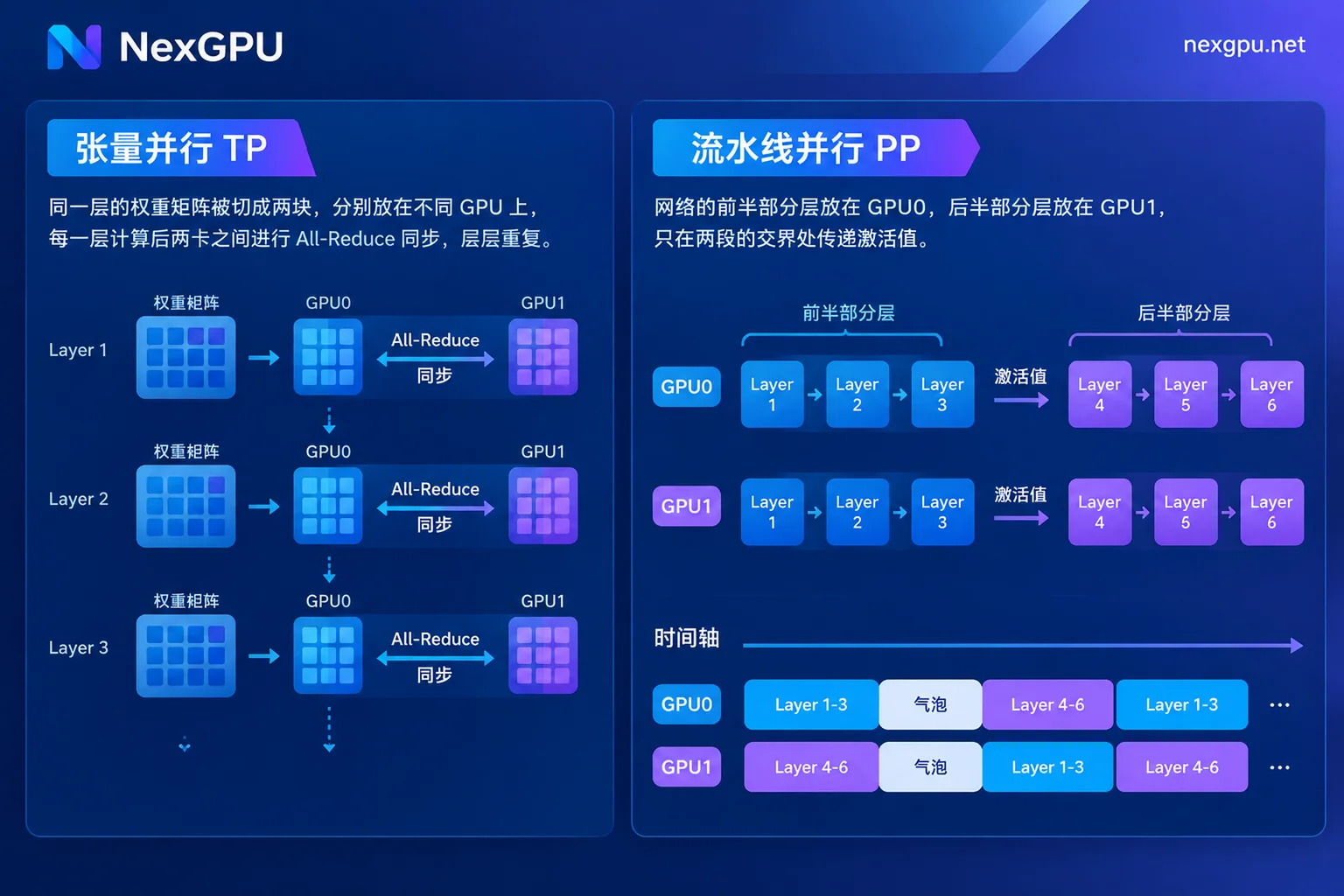
This single difference drives all subsequent choices: TP involves frequent communication and thus relies heavily on interconnect bandwidth; PP has less communication but a single request cannot utilize all GPUs simultaneously.
Latency-first or throughput-first
TP lets multiple GPUs compute the matrix operations of the same request simultaneously, reducing time-to-first-token and per-token decoding latency. For online chat, interactive applications, and scenarios with low concurrency but fast response requirements, TP is more suitable.
PP does not speed up a single request; passing between stages and queuing may even add a little latency. It relies on continuous batching and enough concurrent requests to fill every stage simultaneously to amortize bubbles. Thus, using PP in low-concurrency scenarios often solves the memory issue but leaves GPUs waiting in turn with low utilization.
In short: low concurrency and latency-sensitive → choose TP; high concurrency and throughput-oriented with average interconnect → PP has an advantage.
Confirm GPU interconnect before proceeding
This step is most often skipped but often directly determines the choice. After entering a multi-GPU machine, run:
nvidia-smi topo -mThe output is a pairwise GPU connection matrix. Cells showing NV1, NV2, etc., with the NV prefix, indicate NVLink between the two GPUs; cells showing PIX, PXB, PHB, NODE, SYS indicate PCIe, where SYS further means crossing CPU sockets with higher latency. Most multi-GPU machines built from consumer-grade GPUs use PCIe interconnect.
TP is best suited for single-machine setups with 2, 4, or 8 GPUs interconnected via NVLink or NVSwitch. Running TP over PCIe or cross-machine networks is possible but the higher the GPU count, the larger the communication overhead, causing GPUs to idle. PP has much looser bandwidth requirements and runs stably on PCIe single-machine or ordinary cross-node networks.
If unsure, benchmark a TP configuration and a PP configuration with the same request load and compare latency and throughput.
Parallelism degree is constrained by model structure
Parallelism degrees cannot be set arbitrarily; open config.json in the model directory and check two things:
- TP size must evenly divide the number of attention heads (
num_attention_heads) and KV heads (num_key_value_heads). Models using GQA often have fewer KV heads, which often limits TP upper bound. Even if it divides evenly, setting TP too large makes communication overhead grow faster than computation savings, leading to diminishing returns. - PP size is limited by total layers (
num_hidden_layers); stage layer counts should be balanced. Uneven layer distribution makes the stage with more layers the bottleneck, forcing other GPUs to wait.
For specific values, refer to How to Set Inference Parallelism Degree, which derives step by step: first determine minimum TP from memory, then consider interconnect and business goals.
How to configure in vLLM
Single machine with 4 GPUs and NVLink, use TP only:
vllm serve <模型路径> --tensor-parallel-size 4Single machine with 4 GPUs but only PCIe and high concurrency, try hybrid TP+PP or pure PP:
vllm serve <模型路径> --tensor-parallel-size 2 --pipeline-parallel-size 2
vllm serve <模型路径> --pipeline-parallel-size 4
The first approach suits cases where 4 GPUs have faster pairwise connections—e.g., two pairs each under the same PCIe switch, which can be judged from topo -m results. For cross-machine deployment, typically set TP to the number of GPUs per machine and PP to the number of machines; follow vLLM documentation to configure a Ray cluster for multi-node environments.
Same logic for fine-tuning, with more obvious costs
The same decision applies to training and fine-tuning, but backpropagation also requires communication, making TP more bandwidth-intensive. PP in training splits a batch into multiple micro-batches fed sequentially into the pipeline to reduce bubbles. Frameworks like Megatron-LM commonly use intra-machine TP, inter-machine PP, and outer data parallelism—the so-called 3D parallelism.
If you're only doing lightweight fine-tuning like LoRA on small-to-medium models, first confirm whether a single GPU suffices. Splitting tasks that fit on one GPU only adds complexity.
If throughput is off after deployment, check these three first
After multi-GPU deployment, if throughput doesn't improve significantly, common causes are: running large TP over PCIe, using PP in low-concurrency scenarios, or uneven stage loads. Check item by item following Three-step troubleshooting when multi-GPU inference throughput doesn't double.
Points to note when renting multi-GPU nodes
Even for the same "4 GPUs," interconnect can vary completely between nodes, directly affecting whether TP is worthwhile. When choosing a multi-GPU node on NexGPU, first check node specs on the pricing and available nodes page. If interconnect isn't specified, run nvidia-smi topo -m first thing after booting.
NexGPU bills hourly and meters by the second, so you can spin up a short-lived instance to test both TP and PP configurations before deciding. Note the difference between stop and destroy: stopping still incurs storage fees; only destroying stops all billing. If you need cross-machine deployment or want to evaluate a full cluster solution, contact sales to confirm available multi-node configurations.



