 NexGPU-算力租赁,GPU服务器,GPU云算力,AI服务器租用-新闻博客
FlashAttention-3's memory and speed optimization only reduces HBM reads/writes of the attention intermediate matrix, not weights or KV Cache. Its speedup is tied to the Hopper architecture (H100/H200). According to PyTorch official blog tests from July 2024, on H100 with FP16, compute utilization increased from 35% with FA2 to 75% (740 TFLOPS), and FP8 throughput approached 1.2 PFLOPS. To implement this optimization, follow four steps: 'GPU type — memory breakdown — time share — effectiveness verification' to identify which benefit of FlashAttention-3 memory and speed optimization applies to you. Steps one to four are the core process; the memory breakdown and architecture prerequisites are the basis for judgment, while the comparison record table and OOM troubleshooting are the final steps.
First, Break Down Memory: Which Memory Does FlashAttention-3 Memory and Speed Optimization Reduce?
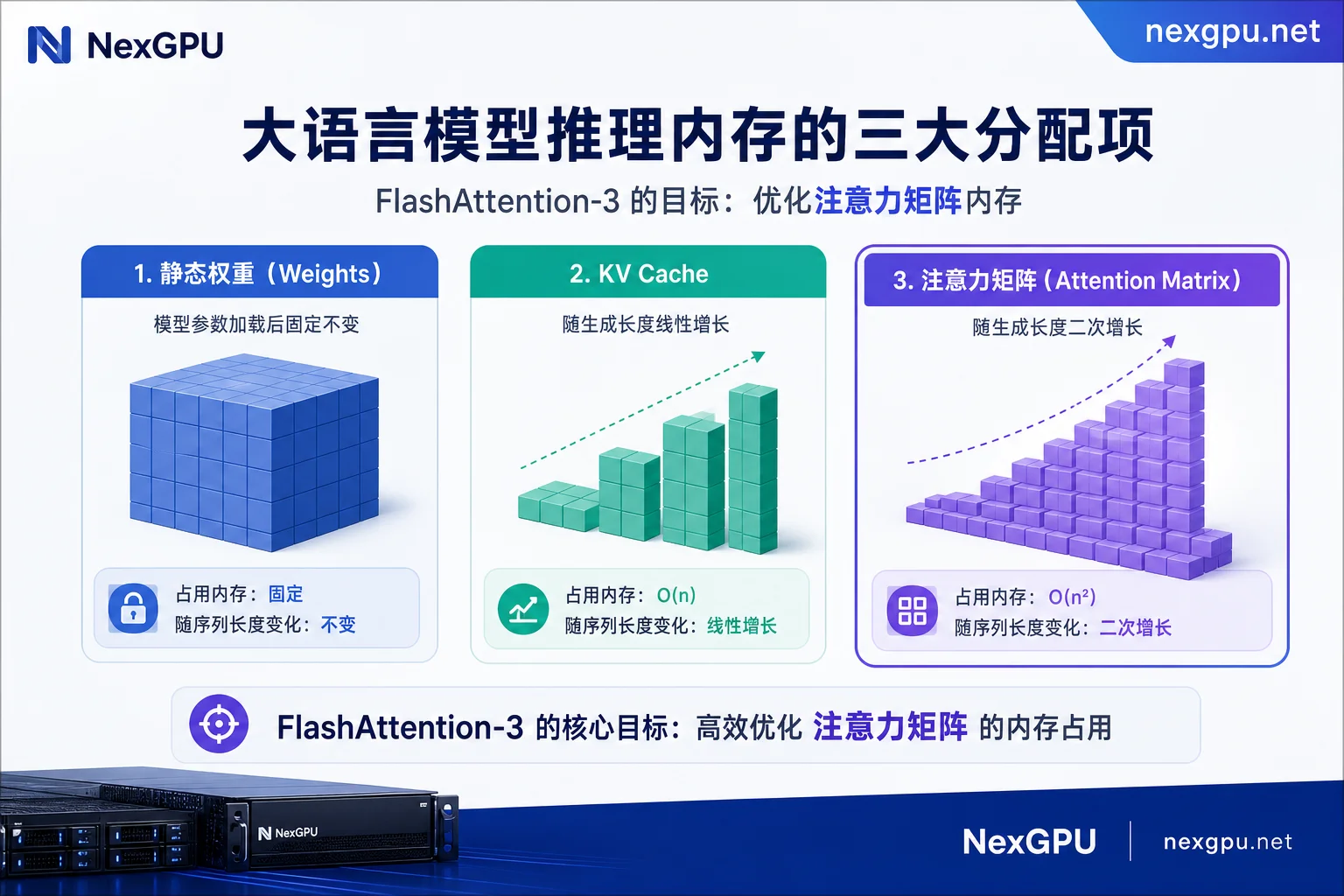
During long-sequence inference, memory is occupied by three components: static weights, KV Cache that grows linearly with context length, and the attention intermediate matrix that grows quadratically with sequence length. FA3 uses blocking and online Softmax to eliminate only the third component—the materialization of the attention intermediate matrix in HBM—without reducing weights or KV Cache.
| Memory Item | Growth Pattern | Reduced by FlashAttention-3 |
|---|---|---|
| Static Weights | Fixed | No |
| KV Cache | Linear with sequence length | No |
| Attention Intermediate Matrix | Quadratic with sequence length | Yes (blocking + online Softmax, avoids materialization to HBM) |
Understanding this clarifies why enabling FlashAttention may still lead to CUDA Out of Memory—the bottleneck is often the KV Cache that grows linearly with 128k context length (see FAQ at the end).
Prerequisites: Why TMA and Warp-Specialization Are Tied to Hopper Architecture
FA3's speedup comes not from compiler options but from hardware units in the Hopper architecture (Compute Capability 9.0). The Tensor Memory Accelerator (TMA) handles asynchronous data movement, and Warp-Specialization divides thread warps into producers and consumers, overlapping computation with HBM transfers. PyTorch official blog (July 2024) tests show FP16 compute utilization on H100 improved from 35% (FA2) to 75% (740 TFLOPS), with FP8 throughput near 1.2 PFLOPS and numerical error 2.6x lower than baseline FP8.
Step 1: Confirm GPU Type and Kernel Version—What GPU Does FlashAttention-3 Need?
Run torch.cuda.get_device_capability() to see if Compute Capability equals 9.0. If so, check whether the FlashAttention installation directory contains a hopper subdirectory. So if you ask 'Can a 4090 use FlashAttention-3?', the answer is: you can install the library, but it won't invoke the Hopper-specific kernel; it will fall back to FA2 or SDPA. RTX 4090 (Ada) and A100 (Ampere) cannot benefit; they must use FA2 or PyTorch SDPA.
Step 2: Estimate Attention Share Based on Sequence Length and Batch
First use PyTorch Profiler to segment timing and see the proportion of end-to-end time taken by the Attention phase. The longer the sequence, the higher the Attention share, but the exact ratio must be based on your own Profiler measurements, not copied from others. This step determines the upper bound of end-to-end benefit from FlashAttention-3 memory and speed optimization.
Step 3: What Workloads Do FP16 75% Utilization and FP8 ~1.2 PFLOPS Correspond To?
FP16 mode (740 TFLOPS, 1.5-2.0x faster than FA2) suits training and high-precision inference; FP8 mode (near 1.2 PFLOPS) suits throughput-priority inference, but you must measure precision loss with your data. These numbers come from FA3's official blog tests on H100; do not extrapolate to other GPUs. If you're also interested in H100 vs H200 differences, see H100 vs H200 inference performance comparison.
Step 4: How to Confirm FlashAttention-3 Is Actually Active
Use the torch.backends.cuda.sdp_kernel context manager to explicitly enable or disable the FlashAttention backend for comparison; directly call flash_attn_interface to verify availability; then use PyTorch Profiler to inspect the actual kernel name, ensuring no fallback to the Math path. If you've confirmed it works on your H100 and want to optimize memory peak related settings, see GPU Out of Memory solutions.
What Metrics to Record When Comparing Same-Load Backend Switches
To quantify the actual benefit of FlashAttention-3 memory and speed optimization, you must control variables. Fix model, sequence length, batch, and precision; only switch the attention backend; record the following metrics:
| Metric | Description |
|---|---|
| Peak Memory | Observe if the intermediate matrix is compressed |
| TTFT (Time to First Token) | Reflects forward compute speed |
| Throughput (tokens/s) | Reflects overall processing capacity |
| Output Consistency | Compare generation differences between FA3 and FA2 |
Only controlled comparisons can distinguish FA3 benefits from other tuning gains.
If OOM Persists After Enabling FlashAttention: Four Common Misconceptions
First misconception: Assuming FA solves long-text OOM, but the bottleneck is KV Cache; you need paged KV management, quantization, or context parallelism. Second: Mistaking FA2 benefits for FA3. Third: Expecting the same speedup on non-Hopper GPUs. Fourth: Concluding without verifying kernel activation.
Alternative Paths for Non-Hopper GPUs
Without Hopper GPUs, FlashAttention-3 memory and speed optimization benefits cannot be replicated. If you have a 4090 or A100, first use FA2/SDPA, then apply quantization to compress weights and KV Cache (see Impact of FP8 and INT4 Quantization on GPU Memory), or use tensor parallelism to distribute memory. To decide long-term GPU choice, the most reliable method is a controlled switch test with the same model, sequence length, and batch—NexGPU offers various GPU server models and pay-as-you-go options, with pre-built model templates to save environment setup costs; run short comparisons and then decide which GPU tier to use long-term.
FAQ
Can I compile and use FA3's full acceleration on a 4090?
No. The 4090 is Ada Lovelace architecture (Compute Capability 8.9), lacking Hopper-specific TMA hardware units and async instruction sets, so it cannot run the hopper directory kernels in FA3. Claims of gaining full 1.5-2.0x speedup through tweaked compilation have not been substantiated.
How much faster is FA3 than FA2 on H100?
According to PyTorch official blog tests from July 2024 on H100, FA3 is 1.5-2.0x faster than FA2 with FP16, with compute utilization rising from 35% to 75% (740 TFLOPS). FP8 throughput approaches 1.2 PFLOPS.
How do I confirm my inference code actually uses FA3 rather than silently falling back?
Two-step confirmation: call flash_attn_interface to see if it's available; use PyTorch Profiler to inspect the kernel name—if you see names related to flash_attn_3 instead of Math or mem_efficient, it's active. You can also use the sdp_kernel context manager to force a specific backend for comparison.
Does FP8 mode in FA3 lose precision?
FA3's official blog shows its FP8 numerical error is 2.6x lower than baseline FP8, but it's not necessarily lossless. Test output consistency with your own model and data, especially in fine-tuning scenarios where FP16 is preferred.
Long-context 128k inference is too slow, and enabling FA3 still results in insufficient memory. What to do?
First confirm the bottleneck is KV Cache, not the intermediate matrix—FA3 does not reduce KV Cache. Consider PagedAttention, KV Cache quantization, or context parallelism. You can also use RTX 4090 multi-GPU vs A100 single-GPU training selection to evaluate memory strategies for different GPU types.



Comments(0)