 NexGPU-算力租赁,GPU服务器,GPU云算力,AI服务器租用-新闻博客
Entering the second half of 2026, the ComfyUI ecosystem has far exceeded the scope of a "standalone node-based drawing tool". As image and video generation models such as Qwen-Image 2.1, the FLUX series, LTX-2.3, and Wan 2.2 continue to integrate into the node ecosystem, more and more e-commerce design teams, AI comic studios, and SaaS developers are pushing ComfyUI to the core of production environments.
However, when the business shifts from "designers manually clicking Queue Prompt to generate images" to "fully automated batch calls from frontend web pages or internal systems", infrastructure contradictions erupt:
- Black-box and high cost of SaaS-hosted APIs: Serverless hosted APIs on the market generally charge per call or per credit. Once you encounter multi-step workflows that require mounting multiple ControlNets, IPAdapters, high-resolution inpainting, or long video extension, the cost per generation can easily spiral out of control; more troublesome is that hosted platforms often impose strict restrictions on non-standard custom nodes and private fine-tuned weights.
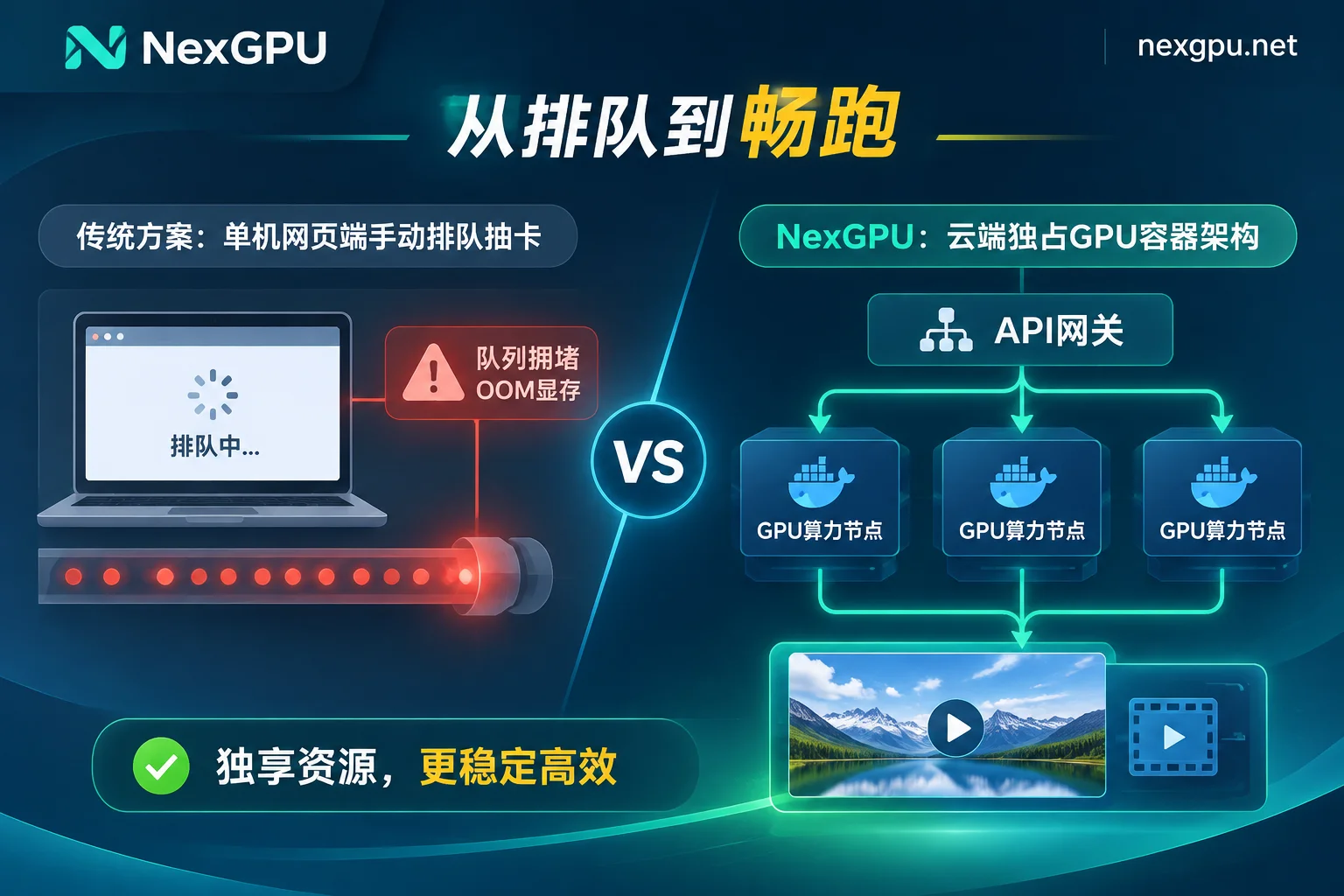
- Concurrency bottleneck of local workstations: Running a single image on one or two consumer-grade GPUs locally is fine, but once connected to a business backend and facing sudden 10 or 20 concurrent requests, the native single-machine queue will leave users waiting endlessly, and may even trigger out-of-memory (OOM) errors and crash the service.
- Environment drift and dependency hell: You finally get a workflow with a dozen plugins working on a single machine, but when you want to replicate it on a second machine for scaling, Python package version conflicts and CUDA compilation errors force you to start over.
In previous articles, we discussed "ComfyUI Cloud GPU Environment Setup and Cost Control: A Practical Guide from Custom Node Freedom and Hundreds of GB Model Management to Stopping Instances while Keeping Disks" and "How to Choose GPU for AI Video Generation: From ComfyUI Quantized Generation and Full-Precision Output to LoRA Training". Today, we completely step out of the "personal interactive drawing" perspective and focus on engineering and serviceization: how to use ComfyUI cloud GPU instances to package tuned JSON workflows into a highly available, horizontally scalable, and cost-transparent production-grade API backend.
I. Why Production-Grade ComfyUI APIs Are Better Suited for Exclusive Cloud GPU Instances
When integrating ComfyUI into business systems, many teams hesitate between "fully managed API platforms" and "self-rented GPU cloud servers". If it's only occasional standard text-to-image calls, managed APIs are indeed convenient; but as soon as complex workflow orchestration, high-frequency batch generation, or data privacy is involved, building your own Worker nodes on hourly-billed computing markets like NexGPU offers clear advantages in engineering freedom and ROI:
- 100% control over environment and data: In an exclusive container instance, you have full root access. Whether compiling specific versions of acceleration operators or mounting internal closed-source LoRAs and Checkpoints, the platform neither restricts node types nor reads disk contents, completely eliminating the risk of commercial material leakage.
- Decoupling of computing cost from call volume: Computing fees are billed by the second and priced by the hour; the unit price is locked upon order until the instance is destroyed. As long as the GPU is running at full load, whether you generate 200 e-commerce white-background images or 1000 sketches in an hour, the computing cost remains constant, completely bidding farewell to "Token/Credit assassins" (see "The New Landscape of AI Computing Rental at the End of 2026: How Can Enterprises Win the ROI Battle Under the Double Attack of Delivery Delays and 'Token Assassins'?").
- Direct network and port exposure: No need to deal with complex intranet penetration; each instance comes with an independent public IP, standard port mapping, and a set of backup ports, naturally suitable for exposing ComfyUI's HTTP/WebSocket interfaces or custom wrapper services to business gateways.
II. From "Runnable" to "Concurrency-Ready": GPU Selection Logic for Production-Grade ComfyUI Cloud GPU
In personal creative scenarios, we can force large models into small-VRAM GPUs via --lowvram or CPU Offload, and even if each image takes 20 seconds longer, it's acceptable. But in API serviceization scenarios, frequent VRAM-RAM data swapping severely slows down per-request latency, causing queue backlog.
Therefore, the core principle for selecting GPUs for ComfyUI API Workers is: keep core large models, text encoders (e.g., T5/Qwen), and commonly used ControlNet weights resident in VRAM to avoid frequent runtime unloading.
In the NexGPU Pricing and Computing Market, each row represents a real rentable physical machine, supporting precise filtering by VRAM, price, region, reliability, network bandwidth, and minimum GPU count. For mainstream production pipelines in 2026, it is recommended to configure Worker hardware according to the following tiers:
| Production Business Scenario | Typical Workflow Load Characteristics | Recommended Cloud GPU Model | Selection Rationale and Concurrency Strategy |
|---|---|---|---|
| E-commerce Image Retouching / High-Frequency Lightweight Generation | SDXL / lightweight distilled models (4-8 step ultra-fast sampling) + 1-2 ControlNets + background removal nodes | RTX 3090 / RTX 4090 (24GB) | 24GB VRAM is sufficient to fully reside the basic pipeline, and single-image time can be reduced to seconds; suitable for cost-effective horizontal throughput scaling by launching multiple single-GPU instances (see "How to Rent RTX 4090 Cloud Servers"). |
| Commercial Posters / Complex Multimodal Workflows | FLUX full-precision/FP8 + multiple IPAdapters + high-definition upscale + multimodal visual inference nodes | RTX 5090 / A100 (40GB/80GB) | Intermediate tensors (Latents) in complex pipelines easily exceed the 24GB boundary; higher VRAM and larger memory bandwidth can completely eliminate OOM errors and ensure 99.9% API success rate. |
| AI Comic / Audio-Video Joint Generation Pipelines | LTX-2.3 / Wan 2.2 / audio-video synchronization nodes + video super-resolution upscale (1080p/2K output) | A100 80GB / H100 / H200 | Video diffusion models and long sequence frame caches have extremely high demands on VRAM capacity and computing throughput; data-center-grade GPUs far exceed consumer cards in heat dissipation and stability under long-term full load (refer to "2026 H100 Rental Practical Guide"). |
GPU Selection Pitfall Prevention Tip: If you are unsure about the exact VRAM threshold for a specific open-source model under quantization or full precision, you can first consult the NexGPU Model GPU Selection Guide. In addition, when you "first select the image environment and then filter machines" in the console, the system will automatically mark machines with insufficient VRAM and indicate the reason, helping you avoid hardware mismatches from the start (for detailed filtering tips, see Official Documentation: How to Choose GPU).
III. Three Steps to Engineering Implementation: Turning ComfyUI into a Stable Backend Microservice
To build a reproducible and maintainable ComfyUI API architecture in the cloud, you cannot rely on manually typing commands to pull code every time you boot up. Here is a three-step standard process verified in practice:
Step 1: Rapid Prototyping with Image Templates, Solidifying Production Environment with Private Docker Images
During workflow development and debugging, you can directly use the pre-installed ComfyUI image and video templates in NexGPU Image Templates. This template comes with pre-installed low-level drivers, CUDA, PyTorch, and common dependencies, so you can start building nodes in the visual interface right after boot.
However, once the workflow is debugged and ready to be deployed as API nodes in batch, it is strongly recommended to package the environment into a custom Docker image:
- The ComfyUI plugin ecosystem iterates extremely fast; a custom node that works today with
git pullmay fail tomorrow due to dependency library updates. - When your custom operators lock specific CUDA versions or Python dependencies, solidifying them into your own Docker image (supporting public or private image repositories) is the most reliable approach.
- When creating an instance on NexGPU, simply fill in your private Docker image address, customize the Start Command and Environment Variables, and the newly launched machine will silently run the ComfyUI API service immediately after startup, achieving "boot and join the production cluster".
Step 2: Establish API Call Chain and Backup Port Mapping
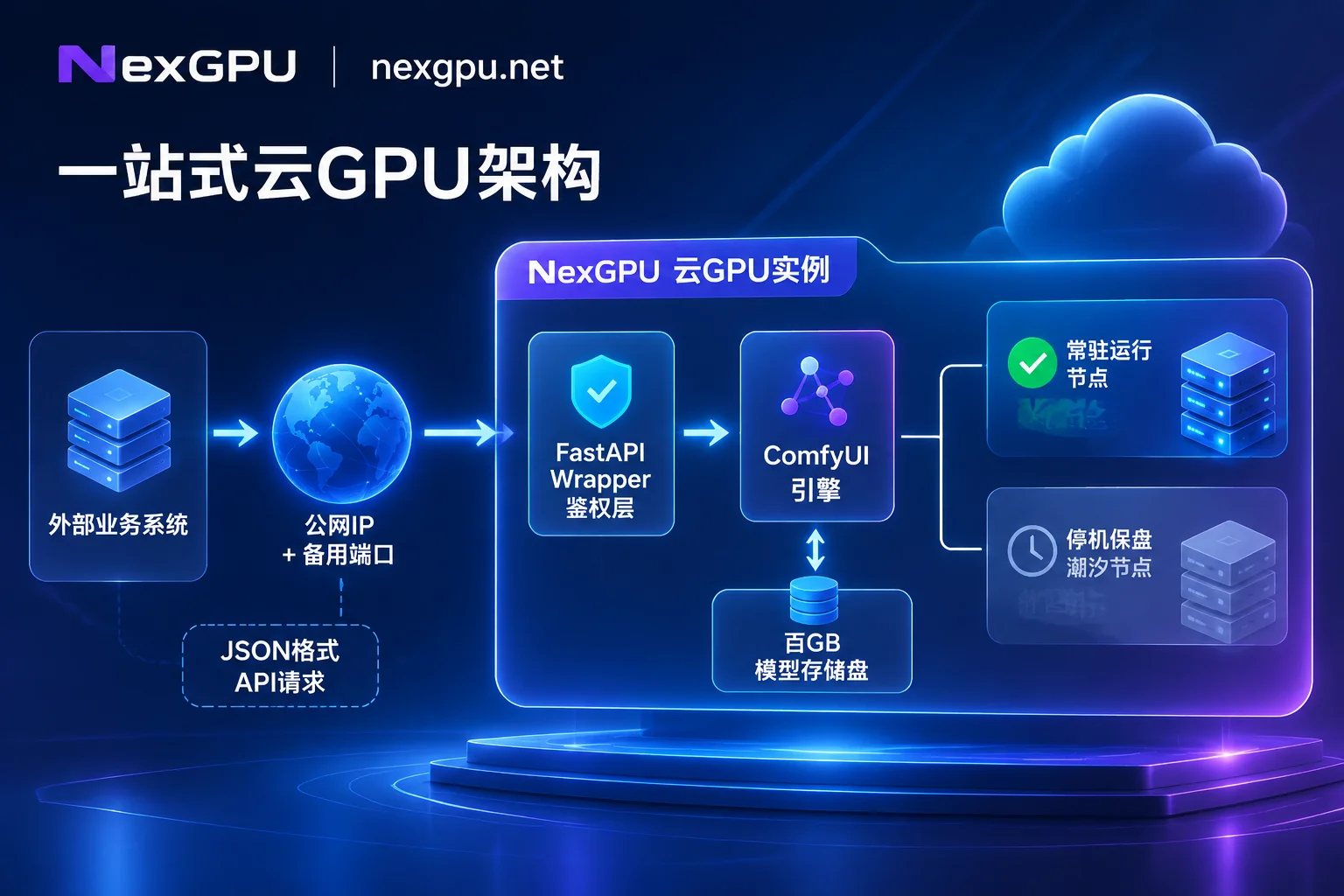
Native ComfyUI has a built-in headless invocation mechanism based on HTTP and WebSocket. You just need to enable developer mode in the frontend interface, click "Save (API Format)", and export a pure data structure workflow workflow_api.json.
When deploying in the cloud, for security and business decoupling, there are usually two ways to expose the service (for connection and port details, see Instance Connection Guide):
- Direct connection to native interface: Using the instance's public IP and mapped port, your business backend (Go/Python/Node.js) directly POSTs the modified JSON (e.g., replacing positive prompts, random seeds, input image URLs) to the cloud instance's
/promptendpoint, and listens for generation progress and real-time preview frames via/wsWebSocket. - Mount lightweight Wrapper and monitoring (using backup port): The native ComfyUI interface lacks authentication (Auth) and automatic result upload to object storage (e.g., S3/COS) logic. You can write a lightweight FastAPI wrapper service on the same instance, listening on the platform's reserved backup port. The business gateway sends Token-authenticated tasks to this backup port; the Wrapper is responsible for locally calling ComfyUI on
127.0.0.1:8188, intercepting error logs, and automatically pushing generated images to the cloud image hosting service before returning a signed URL.
In daily operations and maintenance, besides using web terminal or SSH direct connection (public IP plus port, no jump server) to troubleshoot, you can also install the aaPanel visual management panel with one click, directly managing model file directories, daemons (Supervisor), and scheduled cleanup tasks in the browser, greatly lowering the maintenance threshold for non-dedicated operations personnel.
Step 3: Multi-Instance Horizontal Concurrency and Dynamic Scaling Architecture
A fundamental mechanism that must be clarified: when a single GPU runs a single ComfyUI process, it essentially handles a serial queue. Even if you increase batch_size, limited by VRAM capacity and per-call latency, it cannot simultaneously respond to multiple heterogeneous workflow requests from different users with low latency.
Therefore, the standard solution for high concurrency in production is "external message queue + multi-instance/multi-GPU Worker pool":
- Single-GPU multi-instance horizontal scaling: On NexGPU, there is no hard limit on the number of simultaneously running instances (only constrained by account balance). Facing major promotions or business peaks, you can quickly launch 5 or 10 RTX 4090/5090 instances using the same private Docker image, register them to the business gateway's Redis task queue, and collectively consume image generation tasks.
- Single-machine multi-GPU node partitioning: If you prefer centralized management, you can also filter 4-GPU or 8-GPU nodes in the market by "minimum GPU count" and rent the entire machine (order amount = unit price per GPU × number of GPUs). Inside the machine, by setting
CUDA_VISIBLE_DEVICES=0,1,2..., you can launch multiple ComfyUI processes bound to different ports, achieving multi-Worker concurrent processing on a single machine.
IV. Cost Accounting for Production Environments: How to Save 50% Budget with "Stop-Keep-Disk" and Price Locking?
After moving ComfyUI to the cloud, architects care most about the monthly bill. Many teams have fallen into hidden cost traps on traditional cloud providers (see "2026 GPU Cloud Server Bill Breakdown: How to Avoid Hidden Costs and Calculate Storage, Bandwidth, and Idle Computing Costs?").
In NexGPU's billing system, bills are strictly limited to computing, storage, and traffic, with no activation fees, port fees, or minimum rental duration limits. Combining business peaks and valleys, you can use the following strategies to spend every penny wisely:
- Combination of resident nodes + elastic tidal nodes:
Most ToC image generation applications or internal design tools have obvious day-night tidal effects (e.g., high concurrency during the day and evening, almost no requests at dawn). You can keep 1-2 instances running 24/7 to handle baseline traffic, and configure 3-5 additional as "tidal nodes". - Use "Stop-Keep-Disk" to handle valleys and eliminate cold-start model pulling time:
ComfyUI model libraries are often 100-200 GB. If you destroy instances every time you scale down, pulling hundreds of GB of weights again during the next scale-up is not only time-consuming but also generates unnecessary repeated traffic. In Instance Management, performing a "Stop" operation on tidal nodes immediately stops computing billing, charging only a low GB/month disk storage fee, while the hundreds of GB of models, plugins, and environment inside the machine are preserved intact. Before the next day's traffic peak, simply start it with one click to quickly restore API throughput. - Pre-planning disk capacity and destruction fool-proofing:
Since the platform does not support dynamic disk expansion after instance creation, nor adding/removing port mappings after creation, when initializing production Workers, be sure to reserve sufficient disk space based on the total model size (recommended to reserve 30%+ headroom for temporary output files and aaPanel). Also, the platform does not back up user disk data; performing a Destroy operation requires entering the instance number for secondary confirmation, and once destroyed the disk is immediately released and unrecoverable—therefore, be sure to synchronize and back up core workflow JSONs and self-developed node code via Git repositories or external object storage.
Conclusion: Start Building Your Elastic Visual Generation Engine Today
As AI image and video generation enters the stage of multi-model collaboration and deep customization, whoever can faster transform the latest open-source achievements into stable, low-cost API services will gain absolute initiative in product iteration. No cumbersome real-name verification or quota application required; register now via email at NexGPU Quick Start, choose a high-bandwidth, high-reliability ComfyUI cloud GPU node, and truly turn your node workflow into a productivity engine driving business growth.
(Note: If your team has large-scale long-term concurrency needs and requires evaluation of RDMA high-speed interconnect, private network isolation, reserved instances, or monthly/yearly corporate procurement solutions, please contact the NexGPU sales team directly for customized support.)



